Deep Linking for Mobile Apps: Seamless Web-to-App Experiences
Mobile web traffic converts 3x better in-app. Deep linking automatically opens your app instead of mobile browser, driving engagement and retention.
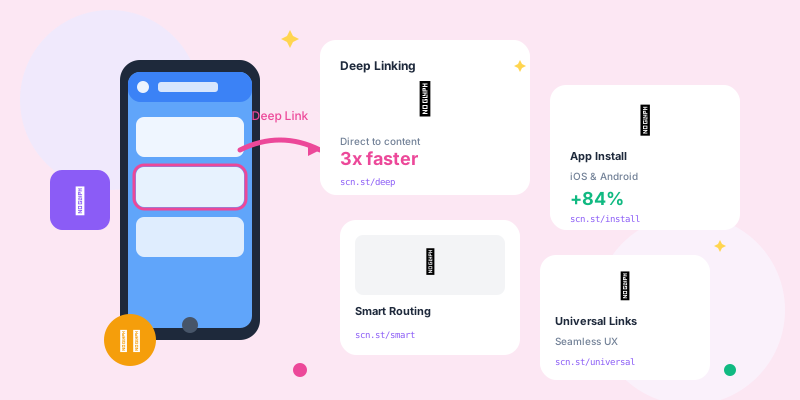
Mobile web is a terrible experience compared to native apps. Deep linking ensures users with your app installed are automatically sent to the app, while new users go to mobile web with clear install prompts.
What Is Deep Linking?
Deep linking opens specific content within mobile apps, bypassing mobile browsers:
- Basic Deep Links: App-only links (app://product/123) - requires app installed
- Deferred Deep Links: Track clicks, send to App Store, then open app content after install
- Universal Links (iOS): HTTPS links that open app if installed, web if not
- App Links (Android): Android equivalent to Universal Links
How Deep Linking Works
- User clicks link:
yourbrand.co/product - Device detection: iOS or Android?
- App detection: Is app installed?
- If app installed: Open app to that specific product page
- If not installed: Show mobile web with install prompt
Why Deep Linking Matters
- Higher Conversion: In-app users convert 3x more than mobile web
- Better Retention: App users are 2-3x more engaged long-term
- Seamless Experience: Already logged in, personalized, faster
- Push Notifications: Re-engage app users after initial visit
- Reduced Friction: No need to search for content again in app
Mobile Web vs Native App Experience
- Mobile Web: Logged out, slow load, limited features, no push notifications
- Native App: Logged in, instant load, full features, push enabled
- Conversion Gap: 67% of mobile web users don't complete actions
- Deep Linking Fix: Automatically send app users to native experience
Universal Links (iOS)
How Universal Links Work
Universal Links are HTTPS URLs that open your app if installed:
- Standard URL:
https://yourbrand.com/product/123 - App installed: Opens app directly to product 123
- App not installed: Opens in Safari (mobile web version)
- Seamless fallback: Same URL works for both
Setting Up Universal Links
- Enable Associated Domains in Xcode - Add capability to app
- Create apple-app-site-association file:
{
  "applinks": {
    "apps": [],
    "details": [
      {
        "appID": "TEAMID.com.yourbrand.app",
        "paths": ["/product/*", "/category/*"]
      }
    ]
  }
}- Host file at domain root:
https://yourbrand.com/.well-known/apple-app-site-association - Implement app delegate handling: Parse incoming URL and navigate to content
- Test: Paste link in Notes app, long-press, verify "Open in App" appears
App Links (Android)
How Android App Links Work
Android App Links are similar to Universal Links:
- HTTPS URLs:
https://yourbrand.com/product/123 - Intent filters: Declare which URLs your app handles
- Auto-verification: Android verifies you own the domain
- Direct opening: No disambiguation dialog, opens app directly
Setting Up Android App Links
- Add intent filter to AndroidManifest.xml:
<intent-filter android:autoVerify="true">
  <action android:name="android.intent.action.VIEW" />
  <category android:name="android.intent.category.DEFAULT" />
  <category android:name="android.intent.category.BROWSABLE" />
  <data android:scheme="https"
        android:host="yourbrand.com"
        android:pathPrefix="/product" />
</intent-filter>- Create assetlinks.json file:
[{
  "relation": ["delegate_permission/common.handle_all_urls"],
  "target": {
    "namespace": "android_app",
    "package_name": "com.yourbrand.app",
    "sha256_cert_fingerprints": ["YOUR_CERT_FINGERPRINT"]
  }
}]- Host at:
https://yourbrand.com/.well-known/assetlinks.json - Handle intent in activity: Parse URL and navigate to content
- Test: Use adb to verify:
adb shell am start -a android.intent.action.VIEW -d "https://yourbrand.com/product/123"
Deferred Deep Linking
The Deferred Deep Link Flow
Track attribution through app install:
- User clicks ad: Sees product they want to buy
- App not installed: Redirected to App Store/Play Store
- User installs app: Downloads and opens for first time
- App opens to product: Taken directly to the item they clicked
- Attribution tracked: Install and subsequent purchase credited to original ad
- No friction - users see exactly what they clicked on
- Higher first-session conversion (30-40% improvement)
- Accurate attribution from click → install → purchase
- Better user experience (no need to search for content)
Implementing Deferred Deep Linking
Use a mobile attribution platform:
- Branch.io: Industry leader, comprehensive features
- AppsFlyer: Strong analytics and attribution
- Adjust: Privacy-focused, GDPR compliant
- Kochava: Enterprise-grade attribution
- Firebase Dynamic Links: Free but being deprecated (use with caution)
Smart Banners
iOS Smart App Banners
Apple's native solution to promote app downloads:
<meta name="apple-itunes-app"
      content="app-id=123456789,
               app-argument=https://yourbrand.com/product/123">
Benefits:
- Native iOS design (users trust it)
- One-tap App Store navigation
- Passes deep link context
- Dismissible (doesn't block content)
Custom Smart Banners
Build your own for more control:
- Detect app installation: Try opening app URL scheme
- Show appropriate CTA: "Open in App" or "Download App"
- Pass deep link data: Include content ID in app store link
- Track interactions: Measure banner performance
URL Schemes vs Universal/App Links
Custom URL Schemes
Old-school approach (still works but limited):
- Format:
yourbrand://product/123 - Pros: Simple to implement
- Cons: Only works if app installed, shows error otherwise
- Cons: Not SEO-friendly (not real URLs)
- Use case: Internal app navigation only
Universal/App Links (Modern Approach)
- Format:
https://yourbrand.com/product/123 - Pros: Real URLs, SEO-friendly, graceful fallback
- Pros: Works in all contexts (email, SMS, web)
- Cons: More complex setup
- Use case: All external links
Attribution and Analytics
Tracking Deep Link Performance
- Click-to-Open Rate: % of clicks that open the app
- Install Rate: % of clicks that result in app install
- Post-Install Engagement: Actions taken after deep link install
- Deep Link vs Web Conversion: Compare performance
- Deep Link Failure Rate: How often deep links don't work
Attribution Platforms
Comprehensive tracking solutions:
- Branch.io: Deep linking + attribution + analytics
- AppsFlyer: Mobile attribution and deep linking
- Adjust: Privacy-focused mobile measurement
- Singular: Marketing intelligence and attribution
Common Deep Linking Use Cases
E-commerce Product Links
- Email campaign links → Specific product in app
- Social media posts → Product detail page in app
- Push notifications → Relevant products in app
- Abandoned cart → Direct to checkout in app
Content Apps (News, Social, Media)
- Article shares → Open article in app
- User profiles → View profile in app
- Playlist shares → Play playlist in app
- Video links → Watch video in app player
Travel and Hospitality
- Hotel booking links → Room details in app
- Flight confirmations → Boarding pass in app
- Restaurant reservations → Booking details in app
- Loyalty program → Points and rewards in app
Financial Services
- Transaction alerts → Transaction details in app
- Payment requests → Payment flow in app
- Investment opportunities → Stock details in app
- Account statements → Document viewer in app
Testing Deep Links
iOS Testing
- Notes App Test: Paste link in Notes, long-press, should see "Open in [App]"
- Safari Test: Paste in Safari, tap - should prompt to open app
- Messages Test: Send link to yourself, tap - should open app
- Branch.io Validator: Use online tool to validate Universal Links setup
Android Testing
- ADB Command:
adb shell am start -a android.intent.action.VIEW -d "https://yourbrand.com/product/123" - Chrome Test: Paste URL in Chrome mobile, tap - should open app
- Gmail Test: Email yourself link, tap - should open app
- Digital Asset Links Tester: Google's validation tool
Troubleshooting Common Issues
- HTTPS only: Universal/App Links require HTTPS
- File accessibility: apple-app-site-association / assetlinks.json must be publicly accessible
- No redirects: Association files can't be behind redirects
- Correct content-type: application/json for both files
- Domain verification: Android auto-verify must pass
- App installed: Obviously, app must be installed to open
- iOS version: Universal Links require iOS 9+
- Android version: App Links require Android 6+
Privacy and User Control
- User Choice: Allow users to prefer web over app
- No Forced Opens: Don't aggressively redirect without permission
- Respect Dismissals: If user dismisses smart banner, don't show again
- Clear Communication: Explain why app experience is better
- Data Minimization: Only track essential deep link analytics
Deep Linking Checklist
- ✅ Implement Universal Links (iOS) and App Links (Android)
- ✅ Host association files at .well-known/ paths
- ✅ Verify files are accessible over HTTPS
- ✅ Test on real devices (iOS and Android)
- ✅ Implement deferred deep linking for attribution
- ✅ Add smart banners for web users
- ✅ Track deep link performance metrics
- ✅ Handle deep link failures gracefully
- ✅ Provide web fallback for non-app users
- ✅ Document deep link URL structure for team
Conclusion
Deep linking is non-negotiable for mobile-first businesses. App users convert 3x better than mobile web, but only if you actually send them to the app instead of browser.
Implement Universal Links and App Links properly. Add deferred deep linking for attribution. Use smart banners to prompt downloads. Test thoroughly on real devices. Your conversion rates will thank you.