Holiday Campaign Tracking: Don't Let Black Friday Chaos Kill Your Data
Black Friday, Cyber Monday, holiday shopping chaos. Your biggest revenue days of the year. And your tracking is a mess. Learn how to track holiday campaigns without losing your mind (or your data).
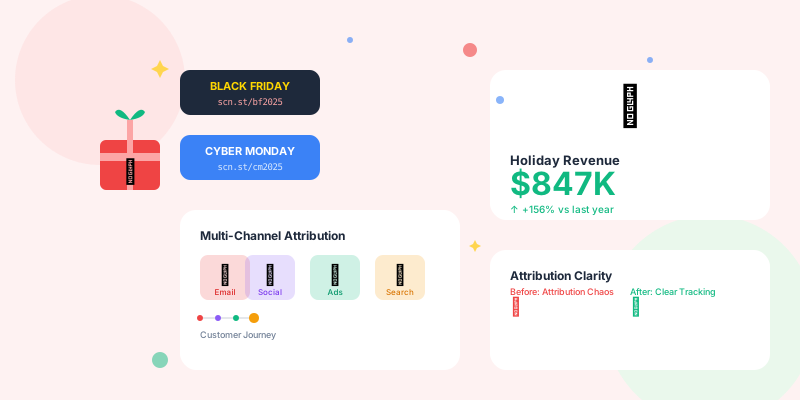
Holiday shopping seasons generate 30-40% of annual e-commerce revenue. Black Friday. Cyber Monday. Holiday shopping weeks. These are your Super Bowl moments. But most brands track holiday campaigns like amateurs—generic links, overlapping promos, zero attribution clarity.
The result? You know you made money. You have no idea which campaigns drove it. Next year, you repeat the same campaigns (winners and losers) because you can't tell them apart.
The Holiday Tracking Challenge
Why Holiday Campaigns Are Different
Normal campaign:- One channel at a time
- Clear start and end dates
- Easy attribution (customer clicks email link, buys)
- Time to analyze between campaigns
- 5-15 campaigns running simultaneously
- Overlapping dates (Black Friday blends into Cyber Monday)
- Multi-touch journeys (sees email, then ad, then influencer post, then buys)
- Zero time to analyze (next campaign launches tomorrow)
- Multi-channel: Customer sees your Black Friday ad on Instagram, searches your brand, receives your email, clicks, buys
- Multi-device: Browses on phone during commute, buys on laptop at home
- Multi-visit: Visits 4 times over 3 days before purchasing
- Multi-offer: Sees "30% off" email, "40% off" retargeting ad, "Buy 2 Get 1" social post
Answer: Without proper tracking, you'll never know.
Holiday Campaign Naming Strategy
The Problem with Generic Naming
What most brands do:
yoursite.com/blackfriday
yoursite.com/cybermonday
yoursite.com/sale
yoursite.com/holiday
- Can't tell which campaign (email vs. social vs. influencer)
- Can't track performance by channel
- All traffic lumped together
- Zero insight into what works
The Smart Holiday Naming System
Structure: Channel-Holiday-Offer-Audience
Channel: email, social, sms, influencer, affiliate, paid, organic
Holiday: bf (Black Friday), cm (Cyber Monday), holiday, newyear
Offer: 30off, 40off, bogo, free-ship
Audience: vip, subscribers, new, cart-abandon

Examples:
yourshort.link/email-bf-30off-vip
yourshort.link/social-bf-40off-new
yourshort.link/sms-cm-freeship-subscribers
yourshort.link/influencer-holiday-bogo-all
- Instantly know: Channel + Holiday + Offer + Audience
- Compare email vs. social performance
- See which offers resonate (30% off vs. 40% off vs. BOGO)
- Track audience performance (VIP customers vs. new visitors)
Pre-Holiday Setup (Do This 2 Weeks Before)
1. Campaign Inventory
List every campaign you're running:
Black Friday (Nov 29):
• Email #1: Early access (VIP only)
• Email #2: Main sale launch
• Email #3: Last chance
• Facebook ads: Retargeting
• Instagram ads: Prospecting
• SMS: Flash sale reminders
• Influencer partnerships: 3 influencers
• Affiliate program: 50+ affiliates

Cyber Monday (Dec 2):
• Email #1: Cyber Monday launch
• Email #2: Extended hours
• Social ads: All platforms
• SMS: Final reminder

Holiday Week:
• Email: Weekly promotions
• Social: Daily deals
• Retargeting: Cart abandonment
Without organized tracking, this becomes attribution chaos.
2. Link Structure Planning
Create link naming document:
Campaign | Channel | Slug | Destination | UTM Parameters
---------|---------|------|-------------|----------------
BF Early Access | Email | email-bf-early-vip | /blackfriday | utm_source=email&utm_medium=email&utm_campaign=bf_2025&utm_content=early_access
BF Main Launch | Email | email-bf-main | /blackfriday | utm_source=email&utm_medium=email&utm_campaign=bf_2025&utm_content=main_launch
BF Social | Facebook | fb-bf-retarget | /blackfriday | utm_source=facebook&utm_medium=paid_social&utm_campaign=bf_2025&utm_content=retargeting
BF Social | Instagram | ig-bf-prospect | /blackfriday | utm_source=instagram&utm_medium=paid_social&utm_campaign=bf_2025&utm_content=prospecting
3. UTM Taxonomy
Consistent UTM structure for all holiday campaigns:
utm_source: Where traffic comes from
• email, facebook, instagram, sms, google, tiktok, influencer_[name]

utm_medium: Type of marketing
• email, paid_social, organic_social, sms, cpc, referral

utm_campaign: Overarching campaign
• bf_2025, cm_2025, holiday_2025, newyear_2026

utm_content: Specific variation
• early_access, main_launch, last_chance, creative_a, creative_b

utm_term: Audience or product (optional)
• vip, new_customer, cart_abandon, product_category
- Consistent naming: Use underscores (not hyphens, not spaces)
- All lowercase: "Black_Friday" and "black_friday" are different in analytics
- Year-specific: bf_2025 (not just bf) for year-over-year comparison
- Descriptive: early_access (not ea), retargeting (not rt)
During the Holiday Campaign
Real-Time Monitoring Dashboard
Set up holiday-specific dashboard: Top metrics (check hourly):- Total revenue (today)
- Revenue by campaign
- Conversion rate by channel
- Top 10 performing links
- Cart abandonment rate
Critical alerts:
• Zero conversions for 2+ hours → Something is broken
• Conversion rate drops below 50% of expected → Technical issue
• Promo code rejection rate above 10% → Code problems

Performance alerts:
• Campaign performing 2x+ above expected → Scale opportunity
• Geographic region outperforming by 3x → Expansion opportunity
• Unexpected traffic source driving sales → Investigate and optimize
Multi-Touch Attribution Tracking
The reality of holiday shopping:
Customer journey:
Day 1 (Nov 27): Sees Instagram ad, clicks, browses
Day 2 (Nov 28): Receives "Early Access" email, clicks, adds to cart
Day 3 (Nov 29): Sees retargeting ad, ignores
Day 3 (later): Receives SMS reminder, clicks, completes purchase

Question: Which touchpoint gets credit?
- SMS gets 100% credit
- Ignores Instagram ad and email that created awareness
- Instagram ad gets 100% credit
- Ignores nurturing from email and SMS
- Instagram: 33% credit
- Email: 33% credit
- SMS: 33% credit
- More fair, but treats all touches equally
- Instagram: 20% credit (3 days ago)
- Email: 30% credit (2 days ago)
- SMS: 50% credit (day of purchase, triggered action)
- Weights recent touches more heavily
Campaign Performance Comparison
Track these metrics per campaign:
Campaign: Email - Black Friday Early Access (VIP)
Slug: email-bf-early-vip
Sent: Nov 28, 8 AM
Clicks: 2,847
Conversion Rate: 8.3%
Revenue: $127,450
ROAS: 42:1 (best performer!)

Campaign: Instagram - Black Friday Prospecting
Slug: ig-bf-prospect
Launched: Nov 29, 6 AM
Clicks: 14,293
Conversion Rate: 2.1%
Revenue: $43,291
ROAS: 2.8:1 (below target, pause or adjust)

Campaign: SMS - Black Friday Last Chance
Slug: sms-bf-lastchance
Sent: Nov 29, 8 PM
Clicks: 4,127
Conversion Rate: 12.7% (highest conversion!)
Revenue: $89,432
ROAS: 89:1 (SMS wins!)
- VIP email + SMS are winning channels (high ROAS)
- Instagram prospecting underperforming (low ROAS)
- Decision: Shift budget from Instagram to SMS for Cyber Monday
Common Holiday Tracking Mistakes
Mistake #1: Using the Same Link Everywhere
Problem:
Email: "Shop Black Friday: yoursite.com/blackfriday"
Social: "Black Friday Sale: yoursite.com/blackfriday"
SMS: "BF Sale Ending: yoursite.com/blackfriday"
- Can't tell which channel drove the sale
- Can't optimize budget allocation
- Can't identify winning channels
Email: yourshort.link/email-bf
Social: yourshort.link/social-bf
SMS: yourshort.link/sms-bf
Now you know exactly which channel drives conversions.
Mistake #2: Promo Code Chaos
Problem:
Email uses code: BLACKFRIDAY
Social uses code: BF30
SMS uses code: FRIDAY30
Influencers use code: [their name]30

Customer tries: BLACKFRIDAY30, BLACK30, FRIDAY (none work, abandons)
- Customers get confused
- Abandoned carts due to code frustration
- Can't track which channel drove code usage
All channels use same code: BF30
But different links:
• Email: yourshort.link/email-bf → Auto-applies BF30
• Social: yourshort.link/social-bf → Auto-applies BF30
• SMS: yourshort.link/sms-bf → Auto-applies BF30

Customer gets consistent code, you get channel attribution
Mistake #3: Ignoring Post-Holiday Attribution
Problem:Black Friday ends Nov 29 at midnight. You stop tracking. But customers bought products as gifts. They received the product Dec 15. They loved it. They came back Dec 20 to buy more for themselves.
Who gets credit for the Dec 20 purchase?- Most analytics: "direct traffic" or "organic"
- Reality: Black Friday campaign introduced them to your brand
Normal attribution window: 30 days
Holiday attribution window: 60-90 days

Why? Holiday purchases have long consideration cycles:
• Gift purchases (buy now, receive later)
• Post-holiday shopping (gift cards, returns, replacements)
• New Year purchases (New Year, new me)
Mistake #4: Not Testing Offers
Problem:You run "30% off sitewide" for Black Friday. You have no idea if:
- 40% off would have driven more revenue
- Free shipping performs better than discount
- BOGO is more profitable than percentage off
Test: Email subscribers (50/50 split)
• Group A: yourshort.link/email-bf-30off → "Get 30% off"
• Group B: yourshort.link/email-bf-freeship → "Free shipping on all orders"

Track:
• Click-through rate (which subject line wins?)
• Conversion rate (which offer converts better?)
• Average order value (which offer is more profitable?)
• Revenue per email (which offer makes more money?)

Winner: Free shipping (4.2% conversion vs. 2.8% for 30% off)
Next year: Lead with free shipping offer
Post-Holiday Analysis
Week After Black Friday (Dec 2-6)
Analyze while it's fresh: Revenue by channel:
Email: $427,000 (42% of total)
SMS: $284,000 (28%)
Paid Social: $178,000 (17%)
Organic Social: $89,000 (9%)
Affiliates: $42,000 (4%)
30% off: $543,000 (53%)
Free shipping: $321,000 (31%)
BOGO: $156,000 (16%)
VIP/returning customers: $672,000 (66%)
New customers: $348,000 (34%)
Month After (January)
Calculate true ROI:
Black Friday campaign:
Total spent: $87,000
Revenue during campaign: $1,020,000
Immediate ROI: 11.7x

But also track:
• Return rate (how many products were returned?)
• Lifetime value (did new customers return?)
• Attribution beyond campaign (post-holiday purchases)

True revenue including post-holiday: $1,240,000
True ROI: 14.2x
Year-Over-Year Comparison
What to compare:
Black Friday 2024 vs. 2025:
• Revenue growth: +23%
• Email performance: +18%
• SMS performance: +47% (major win!)
• Paid social performance: -12% (needs improvement)
• Average order value: +$8 (inflation + upsells working)
• Conversion rate: -0.4% (traffic quality slightly lower)
- Double down on SMS (highest growth channel)
- Rethink paid social strategy (declining performance)
- Continue email tactics (consistent performer)
Advanced Holiday Tracking Strategies
Strategy 1: Segment-Specific Links
Create different links for different customer segments:
VIP customers (purchased 3+ times):
yourshort.link/vip-bf-exclusive
→ Early access, best discount (50% off)

Active customers (purchased in last 90 days):
yourshort.link/active-bf-priority
→ Priority access, good discount (40% off)

Lapsed customers (purchased 90+ days ago):
yourshort.link/comeback-bf
→ "We miss you" messaging, strong discount (45% off)

Cart abandoners:
yourshort.link/cart-bf-saved
→ "Your cart is waiting," cart pre-populated

New subscribers (never purchased):
yourshort.link/new-bf-welcome
→ First-time buyer bonus, extra incentive
Strategy 2: Progressive Disclosure Links
Multi-stage campaigns with separate links:
Stage 1 (Nov 27): Teaser
Email: "Black Friday preview coming..."
Link: yourshort.link/bf-preview
→ Shows products, countdown timer, "Sale starts Nov 29"

Stage 2 (Nov 29, 6 AM): Early access
Email: "VIP Early Access - 3 hours before everyone"
Link: yourshort.link/bf-early
→ Sale is live for VIPs

Stage 3 (Nov 29, 9 AM): Public launch
Email: "Black Friday is LIVE"
Link: yourshort.link/bf-live
→ Sale is now public

Stage 4 (Nov 29, 9 PM): Last chance
Email: "FINAL 3 HOURS"
Link: yourshort.link/bf-final
→ Urgency messaging, countdown timer
Strategy 3: Influencer Tracking
Give each influencer unique link:
Influencer A (fashion): yourshort.link/bf-sarah-fashion
Influencer B (beauty): yourshort.link/bf-kate-beauty
Influencer C (lifestyle): yourshort.link/bf-mike-lifestyle
- Clicks per influencer
- Conversion rate per influencer
- Revenue per influencer
- ROI per influencer (revenue vs. influencer fee)
Sarah: 12,400 clicks, 4.2% conversion, $89,000 revenue, fee $5,000 = 17.8x ROI
Kate: 8,900 clicks, 6.7% conversion, $127,000 revenue, fee $8,000 = 15.9x ROI
Mike: 23,100 clicks, 1.1% conversion, $23,000 revenue, fee $12,000 = 1.9x ROI

Decision:
• Work with Sarah and Kate again (high ROI)
• Mike has huge reach but poor conversion (reconsider for next year)
Holiday Campaign Checklist
2 Weeks Before
- [ ] Map out all campaigns (email, social, SMS, influencer, affiliate)
- [ ] Create link naming convention
- [ ] Generate all campaign links
- [ ] Set up UTM parameters consistently
- [ ] Create tracking dashboard
- [ ] Test all links and promo codes
- [ ] Set up conversion goals in analytics
- [ ] Configure alert thresholds
1 Week Before
- [ ] Double-check all links work
- [ ] Verify promo codes apply correctly
- [ ] Test mobile experience (80% of holiday traffic)
- [ ] Confirm checkout process works
- [ ] Load test site (can it handle 10x traffic?)
- [ ] Brief team on tracking system
Launch Day
- [ ] Monitor dashboard in real-time (first 2 hours)
- [ ] Check conversion rate hourly
- [ ] Verify traffic sources are correct
- [ ] Test purchase flow every 4 hours
- [ ] Monitor for technical issues
- [ ] Track inventory levels (if applicable)
After Campaign
- [ ] Export all campaign data
- [ ] Calculate ROI by channel
- [ ] Compare offers (which performed best?)
- [ ] Analyze audience segments
- [ ] Document wins and losses
- [ ] Plan improvements for next year
Conclusion
Holiday campaigns are too important to track poorly.Black Friday, Cyber Monday, holiday shopping—these campaigns generate 30-40% of annual revenue. You can't afford generic tracking. You can't afford attribution chaos. You can't afford to repeat mistakes because you don't know what worked.
Your action plan: This week (before next holiday season):- Review last holiday campaign tracking
- Identify what data was missing
- Design improved tracking system for next year
- Create all campaign links in advance
- Set up tracking dashboard
- Test everything twice
- Monitor in real-time
- Make adjustments based on data
- Track everything (even small campaigns)
- Analyze while fresh
- Document insights
- Plan improvements for next year
Stop flying blind during your biggest revenue days. Start tracking holiday campaigns like a professional.
Next Black Friday, you'll know exactly what works.