Link Expiration Done Right: Time-Sensitive Campaigns That Actually Convert
Flash sales without expiring links are just regular sales. Learn how to use link expiration to create genuine urgency, prevent discount abuse, and drive 340% higher conversion rates.
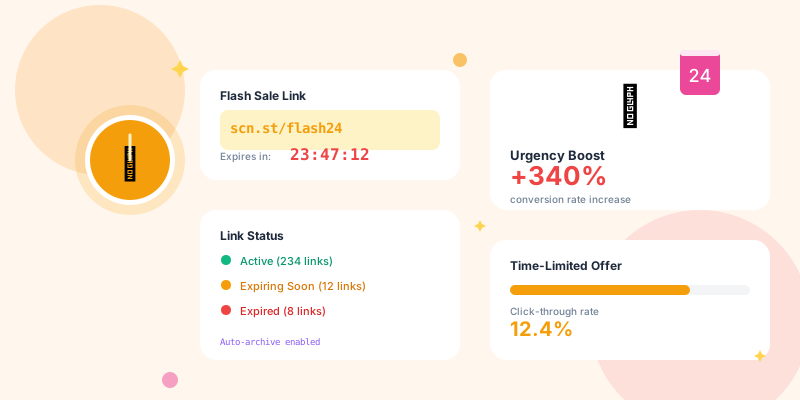
Urgency and scarcity are two of the most powerful psychological triggers in marketing. But they only work if they're real. A "limited time offer" that's available forever isn't limited—it's just lying. And customers can smell fake urgency from a mile away.
Link expiration is how you make urgency real. When your link stops working after 24 hours, the deadline is authentic. When your early-bird link expires after 100 clicks, the scarcity is genuine. Real constraints drive real action.
Why Link Expiration Matters
The Fake Urgency Problem
Scenario 1: Fake urgency
Email: "24-HOUR FLASH SALE! Use code FLASH24"
Reality: Link and code work for 2 weeks
Customer behavior: "I'll check it out later"
Result: Low conversion, damaged trust
Email: "24-HOUR FLASH SALE! Link expires at midnight"
Reality: Link actually stops working at midnight
Customer behavior: "I need to act now or I'll miss it"
Result: High conversion, authentic urgency
- Hour 0-6: Early adopters convert immediately (15% of total conversions)
- Hour 6-18: Moderate interest, casual browsing (25% of conversions)
- Hour 18-23: Urgency kicks in, FOMO intensifies (45% of conversions)
- Last hour: Panic buying, fear of missing out (15% of conversions)
- After expiration: Link doesn't work, offer is actually gone
60% of conversions happen in the final 6 hours when expiration is real. When expiration is fake, conversions are spread evenly (or worse, mostly after the "deadline").
Types of Link Expiration
1. Time-Based Expiration
When it works:- Flash sales (24 hours, 48 hours, weekend only)
- Early-bird pricing (first 7 days)
- Holiday promotions (Cyber Monday, Black Friday)
- Product launches (pre-order window)
- Webinar registrations (closes 1 hour before start)
yourshortdomain.com/flash-sale
↓
Expires: December 15, 2025 at 11:59 PM EST
After expiration: Shows "This offer has ended" page
- `yourshortdomain.com/cyber-monday` → Expires Dec 2, 11:59 PM
- `yourshortdomain.com/early-bird` → Expires 7 days after campaign launch
- `yourshortdomain.com/webinar-dec` → Expires 1 hour before webinar starts
2. Click-Based Expiration
When it works:- Limited inventory (first 100 customers)
- Beta access (limited spots)
- Exclusive access (VIP list)
- Invite-only offers
- Capacity-limited events
yourshortdomain.com/vip-access
↓
Expires after: 100 clicks
After expiration: Shows "All spots have been filled" page
- `yourshortdomain.com/beta-access` → First 50 clicks get beta access
- `yourshortdomain.com/vip-sale` → First 200 clicks get VIP pricing
- `yourshortdomain.com/founding-member` → First 100 clicks get founding member status
3. Single-Use Links
When it works:- Password reset links (one-time use, then expires)
- Email verification (one click, then invalid)
- Personalized discount codes (one customer, one use)
- Ticket confirmations (one redemption)
- Download links (one download, then expires)
yourshortdomain.com/reset-abc123
↓
Expires after: 1 click by authenticated user
After expiration: Shows "This link has already been used"
- Link sharing (can't forward to friends)
- Replay attacks (can't reuse the same reset link)
- Discount abuse (can't use the same personal code multiple times)
4. Conditional Expiration
When it works:- Geographic campaigns (expires outside target region)
- Device-specific offers (expires on desktop, works on mobile)
- Referral links (expires if referee already customer)
- A/B test links (expires when test concludes)
- Campaign for US customers → Link expires if accessed from non-US IP
- Mobile-only flash sale → Link expires if accessed from desktop
- Referral program → Link expires if referred user is existing customer
Implementation Strategies
Strategy 1: The Countdown Landing Page
Don't just expire the link—show the countdown. Standard approach:Link stops working → Generic "This link has expired" page
Better approach:Link shows live countdown → "Sale ends in: 04h 37m 12s" → After expiration, shows "This sale has ended" with alternative offer
Landing page elements:- Real-time countdown timer (updates every second)
- Urgent headline: "Sale Ends in 4 Hours"
- Stock indicators: "Only 23 left at this price"
- Social proof: "127 people bought in the last hour"
- Clear CTA: "Claim Your Discount Before It Expires"
- Server-side time: Use server time, not client time (prevents timezone manipulation)
- Visible placement: Top of page, sticky header, or floating widget
- Color psychology: Yellow/orange for "time running out", red for "last chance"
- Progressive urgency: Change messaging as time runs out ("4 hours left" → "FINAL HOUR" → "LAST 10 MINUTES")
- After expiration: Immediately show "expired" state, don't show 00:00:00 for hours
Strategy 2: Email Sequence with Expiration
Day 1 (Launch):
Subject: 🚨 48-Hour Flash Sale Starts NOW
Body: yourshortdomain.com/48hr-sale
Message: "Get 40% off for the next 48 hours"
Subject: 24 Hours Left: 40% Off Flash Sale
Body: Same link (yourshortdomain.com/48hr-sale)
Message: "Half the time is gone—don't miss out"
Countdown: "Sale ends tomorrow at 9 PM"
Subject: ⏰ FINAL 3 HOURS: Flash Sale Ends Tonight
Body: Same link (same tracking!)
Message: "This is your last chance"
Countdown: "Ends in 2h 47m"
Link automatically shows: "This flash sale has ended"
Optional: "Join our VIP list to get early access to the next sale"
Strategy 3: Progressive Discount Decay
Advanced strategy: Discount decreases as expiration approaches
yourshortdomain.com/launch-sale

Hour 0-24: 50% off
Hour 24-48: 40% off
Hour 48-72: 30% off
Hour 72-96: 20% off
After 96 hours: Link expires

Message changes dynamically:
"50% off for the next 24 hours, then 40% off"
"40% off now, drops to 30% tomorrow"
"FINAL DISCOUNT: 20% off for 12 more hours, then sale ends"
- Early adopters get best deal (rewards action)
- Procrastinators still get something (reduces abandonment)
- Creates multiple urgency peaks (24h, 48h, 72h, 96h deadlines)
- Real scarcity (discount genuinely decreases)
Advanced Expiration Tactics
Tactic 1: Segment-Specific Expiration
Different audiences get different expiration windows:
VIP customers: yourshortdomain.com/vip-early
→ 72-hour early access before public sale
→ Expires when public sale launches

Email subscribers: yourshortdomain.com/subscriber-deal
→ 48-hour exclusive offer
→ Expires when extended to social media

Social media: yourshortdomain.com/social-flash
→ 24-hour flash sale
→ Shortest window for lowest-intent audience
- Rewards loyal customers (VIPs get longest window)
- Creates tiered exclusivity (earlier access = more valuable)
- Drives email signups (people want longer access windows)
- Each segment feels special (not generic "everyone gets the same deal")
Tactic 2: Re-Engagement After Expiration
Link expires, but you're not done marketing:
Customer clicks expired link
↓
Custom "You missed it" page shows:
• "This sale ended on December 15"
• "But you can still save 20% with code COMEBACK20"
• "Or join our VIP list for early access to the next sale"
• Captures email if not already subscribed
↓
Triggers automated follow-up:
• Email: "Sorry you missed the 40% off sale"
• Offer: "Here's 20% off as a consolation"
• CTA: "Don't miss the next sale—join our VIP list"
- Some discount is better than zero conversion
- Captures email for future campaigns
- Teaches customers that deadlines are real (builds trust for next campaign)
Tactic 3: Warning Links
Send "last chance" reminder with the SAME link:
Monday: "48-Hour Sale" → yourshortdomain.com/48hr
Tuesday: "24 Hours Left" → yourshortdomain.com/48hr (same link!)
Wednesday 6 PM: "FINAL 3 HOURS" → yourshortdomain.com/48hr (still same link!)
Wednesday 9 PM: Link expires
- Consistent tracking (all campaign traffic aggregated)
- Prevents confusion (customer saves link, gets reminders about THAT link)
- Shows true urgency (the same link they saved yesterday now says "3 hours left")
- Proves deadlines are real (when link expires, customers learn you're serious)
Technical Implementation
Setting Up Link Expiration
Option 1: Time-based (most common)
Create link: yourshortdomain.com/flash-sale
Expiration: December 15, 2025 at 11:59 PM EST
Expired redirect: yoursite.com/sale-ended
OR
Custom message: "This 24-hour sale has ended"
Create link: yourshortdomain.com/limited-access
Max clicks: 100
Expired redirect: yoursite.com/capacity-reached
OR
Custom message: "All 100 spots have been claimed"
Create link: yourshortdomain.com/beta
Expires: First to happen:
  • 500 clicks
  • OR December 31, 2025
Expired action: Show waitlist signup form
What Happens When Links Expire
Poor user experience:
User clicks expired link
→ Generic 404 error
→ "Page not found"
→ User is confused and frustrated
User clicks expired link
→ Custom expiration page
→ "This 48-hour sale ended on December 15"
→ "But here's what you can do instead:"
  • Current promotions
  • Join VIP list for next sale
  • Browse products at regular price
  • Get notified when this product goes on sale again
- Clear explanation: "This sale ended on [date]" (not just "link expired")
- Next best action: Current offers, alternative products, waitlist signup
- Email capture: "Get notified about future sales"
- Brand consistency: Should look like your site, not a generic error page
- Navigation: Clear path to browse your products/services
Common Mistakes to Avoid
Mistake #1: Fake Expiration
Problem: Saying "24 hours only!" but link works for a week Why it fails:- Customers learn your urgency is fake
- Future campaigns have lower conversion (customers wait to see if deadline is real)
- Damages brand trust
Mistake #2: No Communication About Expiration
Problem: Link expires, but you never mentioned expiration in marketing Why it fails:- Customers click link 2 days later, surprised it doesn't work
- Perceived as broken link, not intentional expiration
- Negative brand experience
Mistake #3: Extending Deadlines
Problem: "Flash sale ends tonight!" → "Due to popular demand, extended 48 hours!" Why it fails:- Customers learn deadlines aren't real
- Next campaign, customers wait for the "extension"
- Trains customers to ignore urgency
Mistake #4: Poor Expiration Page
Problem: Expired link shows generic "404 Not Found" Why it fails:- Customer thinks link is broken, not expired
- No next step (customer leaves site)
- Missed opportunity to capture email or show alternative offers
Mistake #5: One-Size-Fits-All Expiration
Problem: Same 24-hour window for all campaigns (flash sale, webinar, product launch, VIP offer) Why it fails:- Different campaigns need different urgency windows
- VIP customers deserve longer access than cold traffic
- Complex purchases need more decision time than impulse buys
Testing and Optimization
What to Test
Expiration timing:- 24 hours vs. 48 hours vs. 72 hours
- Weekday vs. weekend expiration
- Time of day (midnight vs. 9 PM vs. noon)
- First 50 vs. first 100 vs. first 500
- Unlimited clicks with time limit vs. limited clicks with longer time window
- "Sale ends in 24 hours" vs. "Last chance: 24 hours" vs. "Ends Monday at midnight"
- Countdown timer vs. static deadline
- No offer (hard cutoff) vs. reduced offer (20% instead of 40%)
- Waitlist vs. alternative product vs. "next sale" notification
Key Metrics
Track these for each expiring link:- Total clicks before expiration
- Conversion rate by hour (hour 1 vs. hour 12 vs. final hour)
- Peak traffic times (when do most people click?)
- Post-expiration clicks (how many people try to use expired links?)
- Recovery rate (how many post-expiration visitors convert on alternative offer?)
Conclusion
Real urgency requires real expiration.Saying "limited time" without expiring links is lying. Your customers know it. Your conversion rates show it. And your brand trust suffers for it.
Link expiration makes urgency authentic. When your 24-hour sale link genuinely stops working after 24 hours, customers learn your deadlines are real. When your "first 100 customers" link expires after 100 clicks, customers understand your scarcity is genuine.
Your action plan: This week:- Audit current campaigns: Do you use fake urgency without expiration?
- Set up link expiration for your next flash sale or limited offer
- Create custom expiration page (don't rely on generic 404s)
- Test different expiration windows (24h vs. 48h vs. 72h)
- Implement countdown timers on landing pages
- Create post-expiration email capture system
- Analyze conversion rates by hour (when do people actually convert?)
- Implement progressive discount decay (reward early action)
- Build segment-specific expiration (VIPs get longer windows)
Stop using fake urgency. Start using link expiration. Your conversion rates will thank you.