Link Lifecycle Management: From Creation to Retirement
Links aren't "set it and forget it." They need ongoing management—updating destinations, monitoring performance, handling expirations, and retiring gracefully.
Creating links is easy. Managing them over time? That's where most teams fail. Proper link lifecycle management prevents broken links, maintains brand credibility, and optimizes performance.
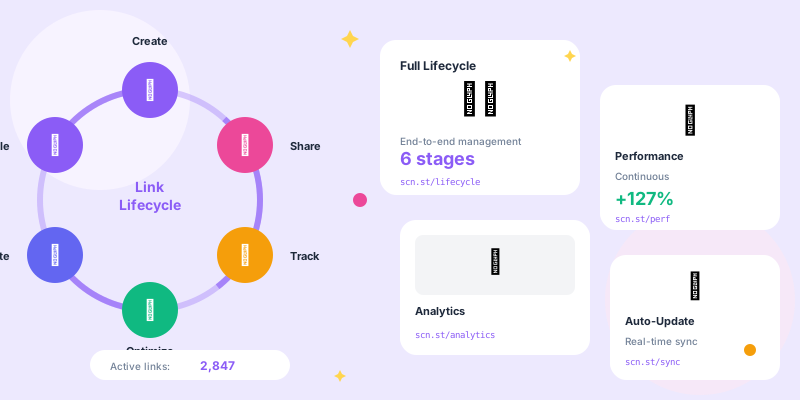
The Link Lifecycle Stages
- Planning: Define purpose, audience, destination, tracking parameters
- Creation: Generate short link with proper naming and organization
- Active Use: Link is live in campaigns, monitored for performance
- Maintenance: Update destinations, fix issues, optimize performance
- Retirement: Archive or redirect to relevant content when campaign ends
Stage 1: Planning
Before Creating Any Link
Answer these questions first:
- Purpose: What is this link for? (campaign, product, content, event)
- Audience: Who will click it? (email subscribers, social followers, paid traffic)
- Channel: Where will it be shared? (email, Instagram, ads, print)
- Duration: How long will this campaign run?
- Success Metrics: What defines success? (clicks, conversions, revenue)
- Format:
[campaign]-[channel]-[date] - Example:
summer-sale-ig-nov24 - Benefits: Easy to find, understand purpose, know when to retire
Documentation
Maintain a link inventory:
- Short URL and destination
- Creation date and creator
- Campaign/project association
- Expected end date
- Performance baseline expectations
Stage 2: Creation
Best Practices for Link Creation
- ✅ Use descriptive, memorable slugs (not random characters)
- ✅ Add UTM parameters for tracking (source, medium, campaign)
- ✅ Tag with campaign/project name
- ✅ Set expiration date if applicable
- ✅ Test link immediately after creation
- ✅ Document in link inventory
- ✅ Share with team members who need access
Quality Control
Before deploying links:
- Test destination: Click and verify it loads correctly
- Check mobile: Test on actual mobile devices
- Verify tracking: Confirm UTM parameters work in analytics
- Spell check slug: Typos in slugs are permanent embarrassment
- Check conflicts: Ensure slug isn't already in use
Stage 3: Active Use
Monitoring Performance
- Click Volume: Is link getting expected traffic?
- Click-Through Rate: Compare to benchmarks
- Conversion Rate: Are clicks converting?
- Error Rate: Check for broken redirects
- Geographic Data: Verify traffic from expected regions
Performance Alerts
Set up automated alerts for:
- Zero clicks in 7 days: Link may be broken or unused
- Sudden traffic spike: Could indicate viral sharing or bot attack
- High error rate: Destination may be down
- Low conversion rate: Landing page issues
Stage 4: Maintenance
Common Maintenance Tasks
- Update destinations: Product URLs change, update links accordingly
- Fix broken links: Monitor for 404s and fix immediately
- Optimize performance: A/B test different landing pages
- Refresh campaigns: Reuse good slugs with new destinations
- Security checks: Verify destinations haven't been compromised
When to Update vs Create New
- Product URL structure changed (maintain link history)
- Campaign still active but destination needs tweaking
- Seasonal campaign reused yearly (update destination annually)
- Landing page optimization (A/B testing)
- Completely different campaign or purpose
- Different traffic source or channel
- Need separate tracking and analytics
- Original link performance was poor (fresh start)
Bulk Updates
Scenarios requiring bulk link updates:
- Domain migration: Moving from old domain to new
- Site restructure: URL patterns changed
- Campaign pivot: Redirecting multiple links to new destination
- Protocol update: Moving from HTTP to HTTPS
Stage 5: Retirement
When to Retire Links
Links should be retired when:
- Campaign ended: Promotion or sale is over
- Product discontinued: No longer available
- Content removed: Blog post deleted or archived
- Event passed: Webinar or conference is over
- Zero traffic: No clicks in 90+ days
Retirement Strategies
- Best for: Links still getting occasional traffic
- Action: Update to point to related content, homepage, or new campaign
- Benefit: Maintains positive user experience
- Best for: Truly dead links with no relevant alternative
- Action: Branded 404 page with navigation options
- Benefit: Better than generic error page
- Best for: Historical reference but no active use
- Action: Mark as archived, maintain redirect
- Benefit: Preserves history without cluttering active links
Never Delete, Always Redirect
Why you shouldn't delete links:
- Bookmarks: Users saved your link
- Email archives: Old emails still have the link
- Social posts: Historical posts can't be edited
- Print materials: Brochures in circulation
- SEO value: External sites linking to you
Link Governance
Team Policies
Establish clear guidelines:
- Who can create links: Anyone? Approved users only?
- Naming conventions: Required format for consistency
- Review process: Who approves links before use?
- Documentation requirements: What info must be tracked?
- Expiration handling: Who manages expired campaigns?
Link Audit Schedule
- Daily: Check for broken links and errors
- Weekly: Review performance of active campaigns
- Monthly: Audit all links, identify retirement candidates
- Quarterly: Deep review of link strategy and organization
- Annually: Archive old links, clean up naming conventions
Automation and Tools
Automated Lifecycle Management
- Expiration dates: Auto-archive links after campaign end date
- Health checks: Daily automated testing of all active links
- Performance alerts: Notifications for anomalies
- Bulk operations: API-based mass updates
- Compliance scans: Check for malicious destinations
Integration with Other Systems
- Marketing automation: Sync link creation with campaigns
- CMS integration: Auto-update product links when content changes
- Analytics platforms: Automatic tracking setup
- Slack/Teams notifications: Alert teams of link issues
Handling Edge Cases
Reusing Popular Slugs
What if you want to reuse brand.co/sale every quarter?
- Option A: Update destination each quarter (maintains analytics history)
- Option B: Create dated versions (
brand.co/sale-q1,brand.co/sale-q2) - Best practice: Decide based on whether historical data matters
Handling Link Conflicts
Two people try to create same slug:
- First-come-first-served (slug taken)
- Versioning (
product-v2) - Team prefixes (
team-sales-product) - Date suffixes (
product-nov24)
Emergency Link Changes
When you need to change a link immediately:
- Identify issue: Broken destination, wrong content, security concern
- Update immediately: Don't wait for approval in emergencies
- Test new destination: Verify fix works
- Document change: Log what changed and why
- Notify stakeholders: Alert relevant teams
Reporting and Insights
Link Portfolio Health Metrics
- Total Active Links: How many links in circulation
- Average Link Age: Are you cleaning up old links?
- Error Rate: % of links with redirect issues
- Utilization: % of links getting traffic
- Top Performers: Which links drive most value
- Zombie Links: Created but never used (waste)
Regular Reports
Stakeholder reporting schedule:
- Weekly: Active campaign performance
- Monthly: Overall link health and top performers
- Quarterly: ROI analysis and strategic review
- Annual: Year-over-year comparison and future planning
Link Lifecycle Management Checklist
- ✅ Establish naming conventions and governance policies
- ✅ Document all links in centralized inventory
- ✅ Set expiration dates for time-sensitive campaigns
- ✅ Monitor link health daily (automated checks)
- ✅ Review performance weekly
- ✅ Audit entire link library monthly
- ✅ Update or retire expired campaigns promptly
- ✅ Never delete links—always redirect
- ✅ Automate routine maintenance tasks
- ✅ Report on link portfolio health regularly
Best Practices Summary
- Plan before creating: Know purpose and duration upfront
- Organize systematically: Tags, folders, naming conventions
- Monitor continuously: Automated health checks
- Maintain proactively: Fix issues before users notice
- Retire gracefully: Redirect to relevant content, never break
- Document everything: Future you will thank present you
Conclusion
Links aren't fire-and-forget. They're living assets that need ongoing management throughout their lifecycle. Create with intention, monitor actively, maintain diligently, and retire gracefully.
Companies that manage link lifecycles properly maintain brand credibility, optimize performance, and avoid the embarrassment of broken links. Those that don't? Their link libraries become graveyards of 404s that damage trust with every broken click.