Personal Branding With Custom Domain Links: Own Your Online Identity in 2026
Every link you share online is an ad for something — either your brand or someone else's. When your short links say "bit.ly" and your bio page is on "linktree.com," you're renting digital identity instead of owning it. Here's how to build a personal brand that's yours from the URL down.
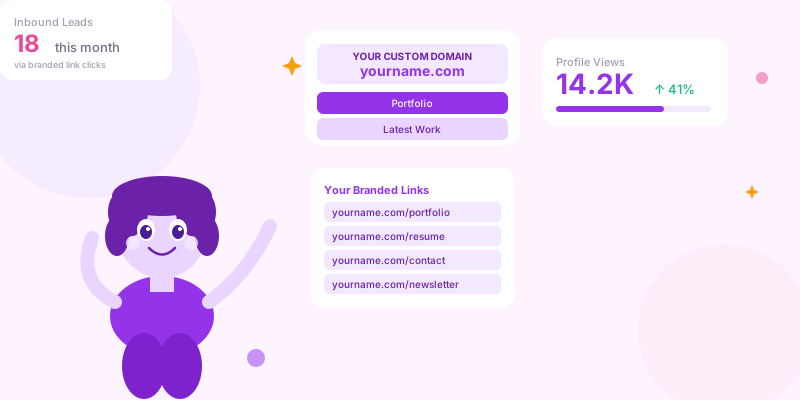
Personal branding used to mean a nice headshot and a consistent LinkedIn presence. Today, it extends to every URL you share. The links in your email signature, in your social media bios, in your pitch decks, in your press kit — these are all impressions. When those links carry your name or brand, every share is reinforcing your identity. When they carry someone else's platform name, you're doing their marketing for them.
Why Custom Domain Links Are a Personal Branding Investment
yourname.com/portfolio
→ 780 reinforcements of "yourname.com" as a professional identity
→ Recipients associate your domain with your expertise
→ If they type your domain later, they're already familiar with it
Generic link: bit.ly/x8k2m or linktr.ee/yourname
→ 780 reinforcements of "bit.ly" or "linktree.com"
→ Recipients remember the content, not the source domain
→ No compounding brand equity
The trust factor:
When a hiring manager, client, or collaborator receives a link from you, a branded custom domain signals:
→ You've invested in your professional presence
→ You're serious about your work
→ The link is less likely to be spam (familiarity removes suspicion)
For consultants, coaches, speakers, and anyone in a trust-based profession — the domain is the first impression before the content.
Building Your Personal Brand Link Stack
The Core Link Set Every Professional Needs
yourname.com) to your link management platform. Then create branded short links for each professional asset:
Professional profile links:
yourname.com/linkedin → your LinkedIn profile
yourname.com/portfolio → your work portfolio
yourname.com/resume → your CV or resume page
yourname.com/about → your bio page or "about me" page
Work and contact links:
yourname.com/contact → contact form or booking page
yourname.com/book → calendar booking link (Calendly, Cal.com)
yourname.com/email → starts an email to you (mailto: link)
yourname.com/work → latest project or case study
Content and media links:
yourname.com/newsletter → newsletter signup
yourname.com/podcast → your podcast or podcast appearances
yourname.com/speaking → speaking reel or booking inquiry
yourname.com/press → press kit (PDFs, headshots, bio)
One evergreen bio page as the hub:
yourname.com/links or simply yourname.com
→ Your link-in-bio page lives at your own domain, not a third-party platform
→ Customize the design to match your brand
→ Add/remove links without changing the URL you share everywhere
The Bio Page as Personal Brand Central
yourname.com should reflect what you're working on and offering right now. Update them monthly. Someone who visits your bio page today should see your current work, not a project from 18 months ago.
Personal Brand Links in Your Email Signature
[Name] | [Title]
[Company or "Independent Consultant"]

🌐 yourname.com
💼 yourname.com/portfolio  ← (tracked: utm_source=email-sig)
📅 yourname.com/book       ← (tracked: utm_source=email-sig)
📧 yourname.com/newsletter ← (tracked: utm_source=email-sig)Presentation Decks and Documents
yourname.com/follow-up
→ Destination: a page specifically designed for "I just saw your presentation" visitors — includes your deck download, contact form, and bio
→ Track how many presentation recipients actually visit vs. how many you pitched
Proposal documents:
→ Every proposal section link uses yourname.com/[project-name]
→ If your proposal is reviewed multiple times, analytics show repeated engagement
→ A prospect who views your portfolio link 4 times is more likely to close than one who viewed once
Guest articles and press:
→ Your author bio in every article: "Learn more at yourname.com"
→ Specific articles that reference your work: yourname.com/article-name
→ Track how many readers from each publication visit your professional profile
Personal Branding Link Checklist
- ✅ Custom domain connected to your link management platform
- ✅ Core professional link set created (portfolio, contact, book, LinkedIn)
- ✅ Bio page at your own domain (not third-party platform URL)
- ✅ Bio page updated with current work and offer monthly
- ✅ Email signature uses branded tracked links
- ✅ Presentation decks end with a memorable short link for follow-up
- ✅ Social profiles all point to yourname.com or yourname.com/links
- ✅ Guest articles include branded author bio link
- ✅ Press kit at yourname.com/press (updateable without re-sharing)
- ✅ Monthly click review: which professional touchpoints drive the most profile visits?
Conclusion
Personal branding is built from thousands of small impressions. Every link you share is one of them. When that link carries your domain, it compounds — each share reinforces your digital identity, builds familiarity with your name, and signals professionalism to everyone who receives it.
The setup is a one-afternoon investment: connect your domain, create your core link set, update your bio page, update your email signature. After that, every link you share is working for your brand instead of Bitly's.