Events are the highest-density lead generation moment of the year — and most organizers leave 80% of that data on the floor. QR codes on badges, signage, sessions, and sponsor activations turn every scan into a tracked touchpoint. Here's the complete event QR playbook.
The Event Data Gap: A 1,000-person conference produces roughly 15,000 meaningful human interactions — hallway conversations, session Q&As, sponsor booth visits, speaker approaches. Most events capture fewer than 500 of them in any trackable form. The rest evaporates. QR codes don't fix every gap, but they turn passive signage into active data collection, and manual badge-swapping into instant digital connections. This is the complete playbook for making every scan count.
The QR code renaissance started with contactless menus during 2020 and never stopped. Today, event attendees scan QR codes without thinking — it's a learned reflex. That behavioral shift is an enormous opportunity for event organizers, sponsors, and speakers who know how to capture it. The problem isn't attendee willingness to scan. It's that most events deploy QR codes as an afterthought rather than as a data infrastructure.
89%
of conference attendees now scan at least one QR code at every event they attend — up from 23% in 2019
The 7 Event QR Code Use Cases That Actually Generate ROI
Use Case 1: Badge QR Codes for Instant Digital Networking
The Problem With Business Cards:
You meet 40 people at a conference. You collect 40 business cards. You put them in your bag. You find them 3 weeks later, crumpled, with no memory of which person was which. Two-thirds go in the trash. This is the standard conference networking outcome for most professionals.
The Badge QR Alternative:
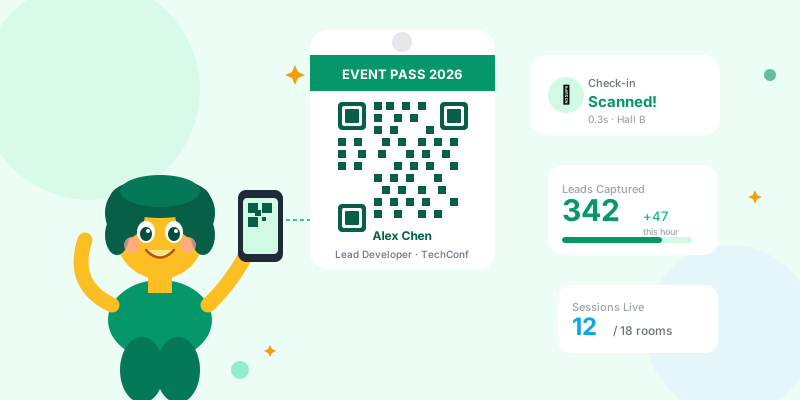
Each attendee badge has a QR code that links to their professional profile, LinkedIn, website, or a custom link-in-bio page. Instead of exchanging cards, you scan each other's badges.
→ Instant connection: their profile opens on your phone in 1 second
→ Context preserved: you see their name, title, company, and links immediately after meeting them
→ No card to lose: the scan is in your browser history and their link works forever
→ Analytics for organizers: scan data shows which networking moments are happening, where, and between whom (aggregated)
Implementation options:
- Attendee-controlled: Attendees submit their preferred link (LinkedIn, website, portfolio) at registration. Organizer generates QR per badge at badge printing time.
- Organizer-hosted: Each attendee gets a QR that links to their profile on the event platform — includes their bio, session notes, and post-event contact form.
- Self-service: Attendees create a scn.st link-in-bio page and submit the URL at registration. QR is generated from that URL. They control what scanners see.
Use Case 2: Session Check-in and Attendance Tracking
Why Session Attendance Data Matters:
You booked 8 speakers for your conference. You want to know which sessions actually drew the crowd, which time slots underperformed, and which topics your audience cares most about — so you can book better speakers next year and allocate rooms correctly.
QR Check-in Setup:
Every session entrance has a large QR code (minimum 15cm × 15cm for fast scanning). Attendees scan when they enter. The scan registers their badge ID (from registration scan) against the session.
What this gives you:
- Real-time headcount per session — know if Room B is over capacity before a safety issue develops
- Attendance rate by ticket tier — are VIP ticket holders showing up to premium sessions or skipping them?
- Session overlap analysis — when two sessions run simultaneously, which drew from which audience?
- Speaker performance data — factual attendance numbers for post-event speaker feedback and future booking negotiations
- Content ROI — map session attendance against post-event survey satisfaction scores to find your best content
The no-app approach:
Use a simple short link QR code that hits a lightweight URL with a session ID parameter. No custom app required — your analytics platform captures the scan data. Attendees don't need to download anything.
34%
of event organizers who implement QR session check-in report significantly improved room allocation decisions at their next event
Use Case 3: Sponsor Booth Lead Capture
The Lead Scanner Problem:
Most conferences sell sponsors a lead scanner — an app that scans badges and exports a CSV of name/email. Sponsors pay $500–$2,000 for this. The CSV arrives after the event. By the time sales follows up, the memory of the conversation is cold.
The QR upgrade:
Instead of (or in addition to) badge scanning, sponsors deploy their own QR codes at the booth:
Booth QR #1: "Get Our Free Guide"
→ Links to a landing page with a lead capture form
→ Visitor fills out their info to get the resource
→ Lead goes directly into sponsor's CRM in real time (not a CSV after the event)
→ Follow-up email triggers immediately — when the person is still at the event and the conversation is fresh
Booth QR #2: "Book a Demo"
→ Links to sponsor's calendar booking page with UTM tracking: utm_source=conference&utm_medium=booth&utm_campaign=techconf2026
→ Attendees who are genuinely interested book while interest is peak
→ Sponsor knows which conference, which booth placement, and which day drove the booking
Booth QR #3: "Product Video"
→ Links to a 90-second product explainer
→ No sales rep needed for every visitor — video handles initial qualification
→ Scan analytics show how many people viewed the demo vs. how many came by the booth (engagement rate)
Use Case 4: Speaker Resource Distribution
Speakers give talks. Attendees want the slides, referenced studies, recommended tools, and follow-up reading. The traditional handoff: speaker mentions their email or website. Attendees forget. Speaker gets zero follow-up.
The Slide QR System:
Every speaker displays a QR code on the final slide of their presentation — persistent for 5 minutes at Q&A time (when most people scan).
The QR links to the speaker's resource hub:
→ Slide deck PDF (downloadable)
→ References and studies cited
→ Recommended tools and resources (affiliate links earn commission)
→ Speaker's bio page with newsletter signup, coaching, book, or consulting link
→ "Connect with me on LinkedIn" shortcut
Analytics value for speakers:
→ Track how many people scanned from each presentation
→ Compare scan rates across conferences to measure audience quality
→ Know which resources are clicked most (slides vs. tools vs. newsletter signup)
→ Build your email list at every event without a giveaway or raffle
Setup: one link, updated per event
Use a single branded short link (scn.st/yourspeakername) pointing to your speaker hub. Update the destination before each event with the current slide deck. Print the QR once, use it at every conference.
Use Case 5: Signage and Wayfinding
Beyond the Paper Map:
Conference venues are confusing. Attendees spend mental energy on navigation instead of networking. QR codes on signage solve this — and generate data as a side effect.
Wayfinding QR placements:
- Entrance signage: QR → full event schedule and map. Attendees start their day with orientation context.
- Session room doors: QR → that room's session schedule for the day. "Is this the right room for the 2pm talk?" answered in one scan.
- Sponsor booth directory: QR → interactive sponsor map with booth numbers and descriptions. Replaces the printed directory that's always out of date.
- Food/break areas: QR → menu, dietary info, networking challenge or icebreaker prompt for that break area.
- Exit signage: QR → post-event survey. Catch attendees when their experience is freshest — not in a follow-up email 3 days later.
Analytics on wayfinding:
Which entrance QR got the most scans? That's where first-time attendees cluster — put your most helpful signage and most senior volunteers there. Which session room QRs got the most pre-session scans? Those are your most anticipated talks — manage overflow seating proactively.
Use Case 6: Gamification and Engagement Challenges
The QR Scavenger Hunt:
Hide QR codes throughout the venue. Each scan unlocks a clue, a trivia question, or a puzzle piece. Complete the sequence → enter for a prize or earn a status badge.
Why it works for events:
→ Drives attendance to undervisited sponsor booths (put required QR scans at booths)
→ Encourages attendees to explore the full venue and all content areas
→ Creates natural conversation starters ("Did you find the one in the sponsor hall?")
→ Generates foot traffic data — which booth QRs got the most game scans?
Sponsor integration:
Charge sponsors a premium for "required stop" placement in the scavenger hunt. Every participant must visit their booth to progress. That's guaranteed foot traffic with a built-in conversation starter ("I'm here for the scavenger hunt scan — what does your company do?"). Far more valuable than a logo on a banner.
Networking challenge variant:
QR code unlocks a networking prompt ("Find someone who has worked in 3+ countries and swap contact info"). Completion earns a digital badge on their conference profile. Turns strangers into conversation partners with a shared goal.
Use Case 7: Post-Session Feedback
Paper feedback forms disappear. Online survey links in follow-up emails get 8% response rates. A QR code displayed during the last 2 minutes of a session — when attendees are still emotionally engaged with the content — captures feedback at peak relevance.
Session Feedback QR Best Practices:
Timing: Display the QR code 3 minutes before the session ends. Announce it verbally: "Before we wrap up, please take 60 seconds to rate today's session — QR code is on the screen."
Form design: 3 questions maximum. Rating, one open field, one yes/no. Longer forms get abandoned mid-scan.
Link setup:
→ Short link per session → each session's form is a separate URL
→ Track response rate vs. attendance to measure engagement level per session
→ Compare sessions across tracks: which format (panel vs. solo talk vs. workshop) generates more feedback?
Speaker incentive: Share scan-rate and feedback data with speakers. Speakers who know their metrics improve faster — and they appreciate the data when deciding whether to speak at your event again.
QR Code Design for Events: Making Them Scannable
Event QR Technical Requirements:
Size guidelines by placement:
- Badge QR: 3cm × 3cm minimum — tested at arm's length scan distance (30–50cm)
- Table tent / desk signage: 6cm × 6cm — tested at 60–80cm distance
- Room entrance signage: 12cm × 12cm — tested at 100–150cm (standing distance)
- Large venue signage / stage backdrop: 25cm × 25cm or larger — tested at 3–5m distance
Contrast requirements:
→ Dark QR on light background (not light QR on dark — most phones struggle)
→ Minimum 4:1 contrast ratio for reliable scanning
→ Avoid placing QR over busy backgrounds or gradient image areas
Error correction:
→ Use "H" level error correction for printed QR codes — allows up to 30% of the code to be damaged and still scan
→ Event environments are rough: scratched badges, crumpled signage, partial coverage by lanyards
Always include a call-to-action text below the QR:
"Scan to connect" / "Scan for slides" / "Scan to check in"
Never assume attendees know what scanning will do — tell them. QR codes without context get scanned less.
Use short links, not raw URLs:
→ QR codes from short links are less dense (fewer dots = faster scan, more reliable)
→ You can update the destination without reprinting QR codes
→ You get analytics — raw URL QRs give you nothing
Event QR Analytics Dashboard: What to Track
Key Metrics by QR Type:
Badge QR (networking):
→ Total scans per attendee profile (popularity / approachability metric)
→ Peak scan times (when is networking happening? Before sessions, breaks, or evening events?)
→ Scanner geography (international attendees networking differently than locals?)
Session QR (check-in):
→ Attendance rate vs. registered interest rate
→ Scan timing pattern (people arriving early vs. last-minute)
→ Drop-off between QR scan and session completion (left early?)
Sponsor booth QR (lead gen):
→ Scan-to-lead conversion rate (scanned the booth QR → filled out the form)
→ Day 1 vs. Day 2 scan volume (traffic pattern for booth placement decisions)
→ Peak scan hours (when to staff the booth most heavily)
Speaker QR (resource download):
→ Scan rate as percentage of audience size (engagement quality metric)
→ Which resource link gets clicked most from the speaker hub
→ Scans by day after event (people sharing the QR in their conference recap posts?)
Wayfinding QR:
→ Entrance scan volume by time (arrival pattern = when to have most staff present)
→ Venue map QR scans by location (which areas are hardest to find?)
Event QR Implementation Timeline
8-Week Event QR Rollout Plan:
8 weeks before event:
→ Define QR strategy: which use cases apply to your event?
→ Identify what each QR should link to (registration forms? Speaker hubs? Session check-in pages?)
→ Create short link structure and naming convention
6 weeks before:
→ Build destination pages/resources that QR codes will point to
→ Generate QR codes via short link platform (update-able if destinations change)
→ Start designing badge layout with QR placement
4 weeks before:
→ Test every QR code on multiple phone models and iOS/Android
→ Test at actual print sizes, not just on screen
→ Share speaker slide QR template and instructions with speakers
2 weeks before:
→ Finalize badge printing with QR codes
→ Print all venue signage with QR codes
→ Brief event staff on QR system and how to help confused attendees
Day of event:
→ Monitor analytics dashboard in real time for scan activity
→ Staff at entrance to assist first-time scanners
→ Check that all QR codes are displaying correctly after setup
Post-event:
→ Export full scan analytics before links expire or destinations change
→ Share sponsor lead data within 24 hours (freshness matters)
→ Send speaker their scan metrics and audience engagement data
→ Compile session attendance report for post-event review
Event QR Code Checklist
- ✅ All QR codes use short links (not raw URLs) for analytics and editability
- ✅ Size tested at intended scan distance before printing at scale
- ✅ "H" level error correction selected for printed codes
- ✅ Call-to-action text below every QR code explaining what the scan does
- ✅ Every QR destination tested on iOS and Android the day before printing
- ✅ Badge QR links to attendee's professional profile or link-in-bio
- ✅ Session check-in QRs ready at each room entrance
- ✅ Speaker slide decks have QR code on final slide with resource hub link
- ✅ Sponsor booth QRs link to lead capture forms (not just the homepage)
- ✅ Post-session feedback QR on final slide, announced verbally
- ✅ Analytics monitoring plan in place for day-of insights
- ✅ Sponsor lead data export scheduled for within 24 hours of event end
- ✅ Speaker scan metrics prepared for post-event speaker communication
Conclusion
Events are the highest-ROI lead generation and relationship-building opportunity most businesses have — and QR codes are the infrastructure that turns passive attendance into active data. The attendees are already there. The moments are already happening. Badge scans turn networking conversations into CRM contacts. Session check-ins turn room traffic into content strategy data. Speaker QR codes turn applause into email subscribers. Sponsor booth scans turn foot traffic into real-time leads.
The best event QR implementations are invisible in use — a natural extension of what attendees are already doing with their phones. Design them that way: clear purpose, right size, a short link that can be updated if anything changes, and full analytics running from the moment the first badge is scanned.
For the full QR code marketing playbook across all channels, see our comprehensive guide: QR code marketing strategies.