Geographic Performance Analysis: Why Texas Converts 3x Better Than California
You spend $50K on nationwide ads. California gets 40% of traffic but 2% conversion rate. Texas gets 8% of traffic but 6% conversion rate. You're wasting $20K on the wrong state. Learn how geographic analytics reveal hidden opportunities.
Most marketers look at total campaign performance: overall clicks, overall conversion rate, overall ROI. They miss massive geographic differences. What works in New York bombs in Wyoming. What's expensive in London is cheap in Manchester.
Geographic performance analysis reveals which locations drive results, which waste money, and where to expand. Without it, you're spending blindly while better-performing regions go underfunded.
Why Geographic Analytics Matter
The Hidden Regional Performance Gap
Scenario: $50K national campaign for B2B software Without geographic analysis:
Total performance:
• 50,000 clicks
• 1,500 conversions
• 3% conversion rate
• $33 cost per acquisition

Decision: "Campaign is performing okay. Maintain current spend."
Performance by state:

Top performers:
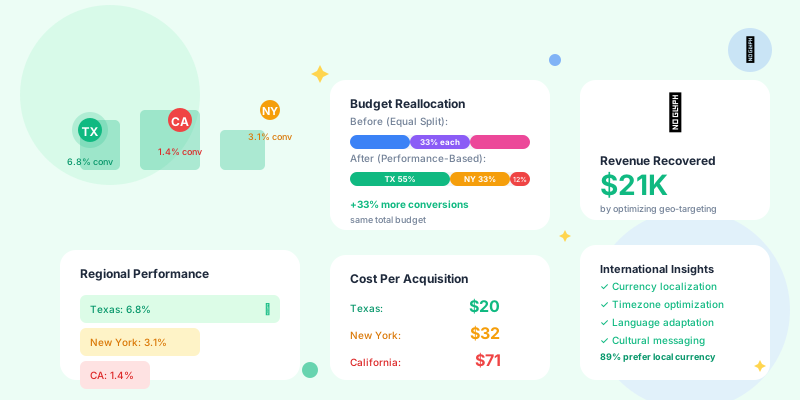
• Texas: 5.8% conversion, $20 CPA (8% of traffic)
• Colorado: 5.2% conversion, $22 CPA (4% of traffic)
• Washington: 4.9% conversion, $24 CPA (6% of traffic)

Middle performers:
• New York: 3.1% conversion, $32 CPA (15% of traffic)
• Illinois: 2.8% conversion, $35 CPA (7% of traffic)

Bottom performers:
• California: 1.4% conversion, $71 CPA (40% of traffic)
• Florida: 1.6% conversion, $62 CPA (12% of traffic)
• New Jersey: 1.2% conversion, $83 CPA (8% of traffic)

Insight:
40% of budget goes to California (worst converter)
Only 8% of budget goes to Texas (best converter)

Action:
Shift $15K from California to Texas/Colorado/Washington
New CPA: $25 (was $33)
New conversions: 2,000 (was 1,500)
Same budget, 33% more conversions
Key Geographic Metrics
1. Conversion Rate by Location
What it tells you:- Which regions have highest intent
- Where your product/service resonates
- Geographic product-market fit
Calculate for each location:
Conversion rate = (Conversions / Clicks) × 100%

Example (B2C e-commerce):
• Seattle: 6.2% (tech-savvy, high income)
• Austin: 5.8% (young professionals)
• San Francisco: 2.1% (high competition, banner blindness)
• Detroit: 1.4% (different audience profile)

Question: Why the difference?

Possible reasons:
- Income levels (can they afford your product?)
- Demographics (does your product fit their lifestyle?)
- Competition (are they saturated with similar offers?)
- Cultural fit (does messaging resonate?)
- Shipping costs (is delivery too expensive there?)
2. Cost Per Acquisition (CPA) by Location
What it tells you:- Where you get most efficient conversions
- Which regions offer best ROI
- Where to increase/decrease spend
For each location, calculate:
CPA = Total spend / Conversions

Example (lead gen campaign):
• Phoenix: $18 CPA (low competition, high intent)
• Dallas: $22 CPA (moderate competition)
• Los Angeles: $67 CPA (high competition, expensive clicks)
• Miami: $41 CPA (moderate competition, lower conversion)

Budget allocation decision:
Current: Equal spend across all cities ($10K each)
Optimized: Weighted by CPA
• Phoenix: $20K (best CPA, scale up)
• Dallas: $15K (good CPA, increase)
• Miami: $5K (okay CPA, maintain)
• Los Angeles: $0 (terrible CPA, pause)

Result: 40% more leads, same total budget
3. Customer Lifetime Value (LTV) by Location
What it tells you:- Which regions drive long-term value (not just conversions)
- Where to invest in retention vs. acquisition
- Geographic expansion priorities
6-month customer data by region:

San Francisco customers:
• Acquisition cost: $150
• Average LTV: $2,400
• LTV/CAC ratio: 16:1
• Retention: 94% after 6 months

Atlanta customers:
• Acquisition cost: $80
• Average LTV: $1,200
• LTV/CAC ratio: 15:1
• Retention: 88% after 6 months

Boston customers:
• Acquisition cost: $200
• Average LTV: $800
• LTV/CAC ratio: 4:1
• Retention: 62% after 6 months

Decision:
San Francisco: High CAC but highest LTV/CAC → Invest more
Atlanta: Low CAC, good LTV → Scale aggressively
Boston: Highest CAC, lowest LTV/CAC → Reduce spend, investigate churn
4. Traffic Quality by Location
What it tells you:- Which regions send engaged visitors
- Where traffic is legitimate vs. bot/fraud
- Geographic audience intent levels
For each location, measure:

Engagement metrics:
• Average session duration
• Pages per session
• Bounce rate
• Time to conversion

Example (content site):
Chicago:
• 4:23 avg session
• 3.8 pages/session
• 32% bounce rate
→ High quality traffic

Mumbai:
• 0:12 avg session
• 1.1 pages/session
• 89% bounce rate
→ Low quality traffic (possible bot traffic or wrong audience)

Action:
• Scale Chicago (high engagement)
• Investigate Mumbai (fraud check or audience mismatch)
Geographic Segmentation Strategies
1. Tier-Based Targeting
Segment locations into performance tiers:
Tier 1 (High performers - 60% of budget):
• High conversion rate (>4%)
• Low CPA (<$30)
• High engagement
→ Scale aggressively, test premium offers

Tier 2 (Moderate performers - 30% of budget):
• Medium conversion (2-4%)
• Medium CPA ($30-$60)
• Average engagement
→ Maintain spend, optimize creative

Tier 3 (Low performers - 10% of budget):
• Low conversion (<2%)
• High CPA (>$60)
• Low engagement
→ Test different messaging or pause

Tier 4 (Non-performers - 0% of budget):
• Very low conversion (<1%)
• Extremely high CPA (>$100)
• Suspected fraud or wrong audience
→ Pause entirely, investigate
2. Urban vs. Rural Targeting
Different strategies for different density:
Urban areas (cities >500K population):
• Higher competition → Higher CPCs
• Faster decision cycles → More impulse purchases
• Better infrastructure → Faster shipping, better mobile coverage
• More ad-saturated → Need standout creative

Strategy: Premium messaging, fast delivery offers, mobile-first

Rural areas (cities <50K population):
• Lower competition → Lower CPCs
• Slower decision cycles → More research before purchase
• Limited options → Less competition, higher intent
• Less ad exposure → Simpler messaging works

Strategy: Value messaging, relationship building, desktop/tablet focus
3. Regional Cultural Adaptation
Tailor messaging to regional preferences:
Example: Insurance company

Northeast (NY, MA, CT):
• Fast-paced, value efficiency
• Messaging: "Get a quote in 60 seconds"
• Creative: Modern, minimalist
• Offer: Time-saving features

Southeast (TX, FL, GA):
• Value relationships, trust
• Messaging: "Local agents you can trust"
• Creative: Warm, personal photos
• Offer: Personal service, community involvement

West Coast (CA, WA, OR):
• Eco-conscious, innovation-focused
• Messaging: "100% paperless, carbon-neutral insurance"
• Creative: Nature imagery, tech-forward
• Offer: Green discounts, app-based service

Midwest (IL, OH, MI):
• Practical, no-nonsense
• Messaging: "Straightforward coverage, fair prices"
• Creative: Real customers, honest testimonials
• Offer: Transparent pricing, bundling discounts
International Geographic Analysis
Currency and Pricing Considerations
Problem: Same product, different purchasing power
Example: $50/month SaaS product

United States ($50):
• 4% of median monthly income
• Conversion rate: 5%

United Kingdom (£40 ≈ $50):
• 5% of median monthly income
• Conversion rate: 4.2%

India (₹4,200 ≈ $50):
• 18% of median monthly income
• Conversion rate: 0.8%

Analysis:
India has 20x the population of UK, but converts 5x worse
→ Price is barrier (18% of income vs. 4% in US)

Solution:
• Create India-specific pricing (₹1,500 ≈ $18)
• Lower price, but 5x conversion increase
• Net revenue: Higher than $50 with 0.8% conversion
Timezone Optimization
Send campaigns when target audience is awake:
Email campaign to multiple countries:

Bad approach:
Send at 9 AM EST (your timezone)
→ 9 AM for New York
→ 6 AM for Los Angeles (too early)
→ 2 PM for London (after lunch slump)
→ 11 PM for India (asleep)

Good approach:
Send at optimal local time for each region
→ US East Coast: 9 AM EST
→ US West Coast: 9 AM PST (12 PM EST)
→ UK: 9 AM GMT (4 AM EST)
→ India: 9 AM IST (11:30 PM EST previous day)

Result: 43% higher open rates, 31% higher click rates
Language and Localization
Beyond translation:
Poor localization:
UK landing page with "$" prices, "trunk" instead of "boot", US phone numbers

Good localization:
• Currency: £ for UK, € for EU, $ for US
• Spelling: Colour/color, organise/organize
• Terminology: Boot/trunk, mobile/cell phone, post/zip code
• Phone: +44 for UK, +1 for US, local numbers
• Shipping: "Free delivery UK-wide" not "Free shipping"
• Dates: DD/MM/YYYY (UK) vs. MM/DD/YYYY (US)
• Payment: Support local methods (iDEAL in Netherlands, Boleto in Brazil)
Geographic Fraud Detection
Spotting Suspicious Geographic Patterns
Red flags in location data:
Warning sign #1: Unexpected traffic spikes from unlikely locations

Example:
You sell winter coats in US/Canada
Suddenly: 40% of traffic from Philippines, Nigeria, Indonesia

Analysis: Either you went viral in tropical countries (unlikely) or bot traffic

Warning sign #2: High traffic, zero conversions from specific country

Example:
Russia: 5,000 clicks, 0 conversions, 0.2 second avg session
→ Bot traffic from click farm

Warning sign #3: Impossible user behavior

Example:
Same user clicks from New York, then Tokyo 5 minutes later
→ VPN or bot (not a very fast traveler)

Warning sign #4: Mismatched language/location

Example:
Traffic from Japan, but browser language is English (US)
→ VPN or proxy traffic
1. Separate legitimate from fraud traffic
→ Filter out suspicious regions from analytics

2. Block or challenge suspicious locations
→ Add CAPTCHA for high-risk countries
→ Block known VPN IP ranges
→ Require additional verification

3. Focus budget on verified legitimate traffic
→ Geo-fence campaigns to proven locations
→ Don't waste budget on bot traffic
Geo-Targeting Best Practices
1. Radius Targeting (Local Businesses)
Target by distance from location:
Example: Restaurant promotion

Option A: City-wide (entire Los Angeles)
• Reach: 10 million people
• Realistic customers: 50,000 (within 30 min drive)
• Wasted impressions: 99.5%

Option B: 5-mile radius (around restaurant)
• Reach: 250,000 people
• Realistic customers: 40,000 (will actually visit)
• Wasted impressions: 84%

Option C: 2-mile radius (walking/short drive distance)
• Reach: 50,000 people
• Realistic customers: 35,000 (highly likely to visit)
• Wasted impressions: 30%

Best approach: Option C
Smaller reach, but much better relevance
Lower CPCs (less competition at hyper-local level)
Higher conversion (only showing to people who can realistically visit)
2. Exclude Non-Converting Locations
Negative geo-targeting:
After 30 days of data:

States with 0 conversions despite 500+ clicks:
• Wyoming
• Montana
• North Dakota

Action: Exclude these states from targeting

Result:
• Budget reallocated to converting states
• Lower wasted spend
• Better overall ROI

Note: Check back quarterly (maybe they convert seasonally)
3. Bid Adjustments by Location
Pay more for high-performers, less for low-performers:
Platform: Google Ads, Facebook Ads

Base bid: $5 CPC

Location bid adjustments:
• California: -40% ($3 CPC) - Low conversion, reduce spend
• Texas: +60% ($8 CPC) - High conversion, aggressive bidding
• New York: +20% ($6 CPC) - Good conversion, moderate increase
• Florida: -20% ($4 CPC) - Below average, slight reduction

Result:
More impressions in high-converting states
Fewer impressions in low-converting states
Better overall campaign ROI
Geographic Reporting Dashboards
Essential Views
1. Geographic heatmap:
Visual representation:
• Dark green: High conversion, low CPA (scale these)
• Light green: Good performance
• Yellow: Average performance
• Orange: Below average (optimize or reduce)
• Red: Poor performance (pause or exclude)
Top 10 locations by ROI:
1. Austin, TX - 6.2% conv, $18 CPA, 320% ROI
2. Denver, CO - 5.9% conv, $19 CPA, 305% ROI
...

Bottom 10 locations by ROI:
1. Newark, NJ - 0.9% conv, $92 CPA, -34% ROI
2. Memphis, TN - 1.1% conv, $78 CPA, -12% ROI
...

Action items visible instantly
Line graph by region:
• Texas: Upward trend (5.1% → 5.8% over 3 months)
• California: Downward trend (2.1% → 1.4% over 3 months)
• New York: Stable (3.1% → 3.2%)

Insight: Texas is improving (working), California is declining (investigate)
Case Study: Geographic Optimization in Action
Scenario: E-commerce Fashion Brand
Initial state (nationwide targeting):
Budget: $30,000/month
All 50 states targeted equally
Overall conversion rate: 2.8%
Overall CPA: $42
Monthly revenue: $85,000
ROI: 283%
Data revealed:
• Top 10 states: 6.1% conversion, $22 CPA
• Middle 25 states: 2.9% conversion, $41 CPA
• Bottom 15 states: 0.8% conversion, $94 CPA

Problem: 30% of budget going to bottom performers (15 states)
→ $9,000/month wasted on states with terrible ROI
Action taken:
1. Pause bottom 10 states entirely (0.3-0.6% conversion)
2. Reduce middle performers by 40% (reallocate budget)
3. Increase top 10 states by 80% (scale winners)

Budget reallocation:
• Top 10 states: $18,000 (was $6,000) → +200%
• Middle 25 states: $12,000 (was $15,000) → -20%
• Bottom 15 states: $0 (was $9,000) → Paused
Budget: $30,000/month (unchanged)
Overall conversion rate: 4.9% (was 2.8%)
Overall CPA: $24 (was $42)
Monthly revenue: $147,000 (was $85,000)
ROI: 490% (was 283%)

Impact:
+73% increase in revenue
-43% decrease in CPA
+207% increase in ROI
Same exact budget, better allocation
Conclusion
Your campaign doesn't have one conversion rate. It has 50 conversion rates (or 190+ if international).Treating all locations equally is like serving the same food to everyone regardless of dietary restrictions. Some people are thriving, some are sick, and you don't know who's who because you're not paying attention.
Geographic performance analysis reveals:
- Which locations drive results (scale these)
- Which locations waste money (pause these)
- Which locations need different messaging (adapt these)
- Pull geographic breakdown of your top campaign
- Identify top 3 and bottom 3 performing locations
- Calculate difference in CPA and conversion rate
- Reallocate 20% of budget from bottom to top performers
- Test location-specific creative in one market
- Set up geographic performance dashboard
- Implement tiered geographic targeting across all campaigns
- Create location-specific landing pages for top markets
- Measure revenue impact of geographic optimization
Stop treating California and Wyoming the same. Start funding locations that actually convert.
Your budget should follow performance, not population.