Bio Page SEO: How to Rank Your Link-in-Bio Page on Google (And Why You Should)
Most link-in-bio pages are invisible to Google — no title tags, generic descriptions, third-party subdomains. But a properly SEO'd bio page on your own domain can rank #1 for your name, capture branded search traffic, and become your most durable online presence. Here's how.
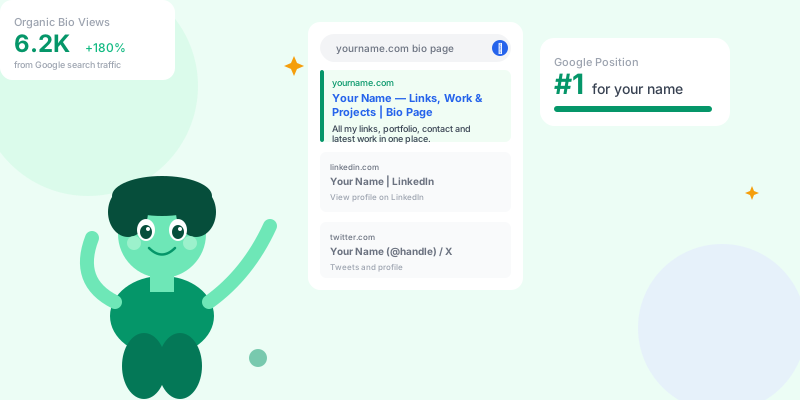
Branded search — people searching for your name or company — is the highest-intent traffic you'll ever get. Someone searching for you already knows who you are. They're looking for a way to engage. Most professionals fumble this moment with a fragmented presence: LinkedIn here, website there, bio page somewhere else. A well-optimized bio page unifies everything and tells Google exactly what you want it to say about you.
Why Bio Pages Are Naturally SEO-Friendly
Technical SEO for Bio Pages
The Non-Negotiable Technical Requirements
linktree.com/you, not scn.st/you (as the final URL), but yourname.com or a subdomain of your primary domain.
Why: Google attributes authority to domains, not pages. A page at yourname.com builds authority for your domain. A page at linktree.com/yourname builds authority for Linktree.
2. Optimized title tag:
[Your Full Name] — [Your Role/Positioning] | yourname.com
Example: "Sarah Chen — Product Designer for SaaS Companies | sarahchen.com"
→ Keep under 60 characters
→ Include your full name (primary keyword) and positioning (context keyword)
→ Never use generic titles like "My Links" or "Bio Page"
3. Meta description:
[Name] is [what you do] for [who you serve]. Connect, view [portfolio/work/content], and [CTA].
Example: "Sarah Chen is a product designer specializing in SaaS onboarding. View her portfolio, case studies, and connect for freelance projects."
→ 150–160 characters
→ Include your name, specialization, and one clear action
→ This is your pitch in search results — write it like a one-line bio for someone who's never heard of you
4. Canonical URL:
Ensure your bio page has a canonical tag pointing to itself. If you have both www.yourname.com and yourname.com, choose one and canonical the other.
5. Open Graph and Twitter Card meta tags:
→ og:title: same as your page title
→ og:description: same as meta description
→ og:image: professional photo or brand image (1200×630px)
→ These determine how your bio page looks when shared on social — a good image dramatically increases click-through rate when shared
On-Page Content Optimization
Schema Markup for Bio Pages
Person schema.
Basic Person schema for bio pages:
<script type="application/ld+json">
{
  "@context": "https://schema.org",
  "@type": "Person",
  "name": "Your Full Name",
  "url": "https://yourname.com",
  "image": "https://yourname.com/photo.jpg",
  "jobTitle": "Product Designer",
  "worksFor": {
    "@type": "Organization",
    "name": "Your Company or Consulting"
  },
  "sameAs": [
    "https://linkedin.com/in/yourname",
    "https://twitter.com/yourname",
    "https://github.com/yourname",
    "https://youtube.com/@yourname"
  ]
}
</script>sameAs array tells Google: "these are all the same person." When Google sees the same person entity referenced across LinkedIn, Twitter, and your bio page, it builds confidence in your entity identity. This is how you get a Knowledge Panel (the box on the right side of Google search results for prominent individuals).
Adding to scn.st bio pages:
If your bio page is hosted on scn.st, ensure your page title, description, and display name are fully optimized — these feed the meta tags that Google crawls. Connect your own custom domain for maximum SEO benefit.
Link Building for Bio Pages
yourname.com as the link. Each publication you contribute to becomes a backlink.
Podcast appearances:
Every podcast show notes page links to guest bios. Request that the host links to your custom domain bio page, not your LinkedIn. A podcast appearance on a domain with DA 40+ is a high-quality backlink that most professionals never claim.
Speaking and event listings:
Conference websites list speakers with bios and links. Ensure your speaker profile links to yourname.com, not a social profile. Event websites are often well-indexed and add referral authority to your domain.
Social profile links:
Every social profile you control has a "website" field:
→ LinkedIn: yourname.com
→ Twitter/X bio link: yourname.com
→ Instagram bio: yourname.com
→ GitHub profile: yourname.com
→ YouTube about: yourname.com
These are "nofollow" links from domain-authority giants. They don't directly pass PageRank, but they signal to Google that yourname.com is your canonical web presence — which strengthens entity identity.
Wikipedia / Wikidata:
If you're notable enough for a Wikipedia entry (has been written by others about you), ensure your bio page is listed in external links. Wikidata entity records can also link to your canonical URL and directly influence Knowledge Panel generation.
Tracking Your Bio Page SEO Performance
Bio Page SEO Checklist
- ✅ Bio page hosted at your own custom domain, not a third-party subdomain
- ✅ Title tag includes full name + role + domain (under 60 characters)
- ✅ Meta description written as a professional one-liner (150–160 characters)
- ✅ H1 tag contains your full name
- ✅ Bio text block (100–200 words) with name, role, specialization, notable employers/clients
- ✅ Open Graph image set (1200×630px professional photo)
- ✅ Person schema markup implemented with sameAs array
- ✅ All social profiles "website" fields point to your custom domain bio page
- ✅ Guest post author bios link to custom domain (not LinkedIn)
- ✅ Podcast appearance show notes request link to custom domain
- ✅ Google Search Console set up for your domain to monitor branded search performance
Conclusion
Your name is a keyword. People search for it. What they find — and what they do next — is determined by how well you've optimized your digital presence. A bio page on your own custom domain, with proper title tags, a bio text block, Person schema, and backlinks from your guest posts and speaking appearances, can rank #1 for your name within months and stay there.
The investment is a few hours of setup. The return is permanent — every person who Googles you finds exactly what you want them to find, with the links you want them to click, in the order that serves your professional goals. That's the highest-ROI SEO you can do for your personal brand.