Do Short Links Kill SEO? The Truth About URL Shorteners and Search Rankings
SEO experts say URL shorteners hurt rankings. Link builders say they're essential. Who's right? The answer is more nuanced than both sides admit. Here's what actually happens to your SEO when you use short links.
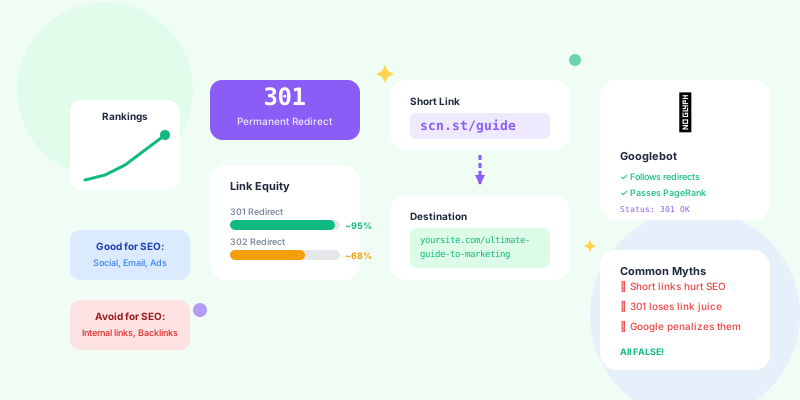
Google's official stance: "301 redirects pass PageRank." Clear answer, right? Wrong. Because the question isn't whether short links can pass SEO value—it's whether they do in practice, and under what conditions.
The truth: Short links don't inherently hurt SEO. But bad implementation of short links absolutely can. And most people implement them badly.
How Short Links Actually Work (Technical Reality)
The Redirect Chain
What happens when someone clicks a short link:
User clicks: yourshort.link/deals
↓
Browser requests: yourshort.link/deals
↓
Server responds: 301 redirect to yoursite.com/black-friday-sale
↓
Browser requests: yoursite.com/black-friday-sale
↓
Page loads
- Redirect type: 301 (permanent) vs. 302 (temporary)
- Redirect speed: How fast does the redirect happen?
- Redirect chain length: One hop vs. multiple hops
- Final destination: Where does it ultimately land?
- 301 Permanent Redirect: Passes full link equity (use this for SEO)
- 302 Temporary Redirect: May not pass link equity (avoid for SEO)
- Meta Refresh: Passes zero link equity (never use for SEO)
What Google Actually Sees
When Googlebot encounters a short link:
1. Googlebot crawls page with short link: yourshort.link/article
2. Googlebot follows the 301 redirect
3. Googlebot arrives at: yoursite.com/complete-guide-to-topic
4. Googlebot indexes: yoursite.com/complete-guide-to-topic
5. Link equity flows to: yoursite.com/complete-guide-to-topic

The short link itself doesn't get indexed or ranked.
The final destination receives the SEO value.
When Short Links DON'T Hurt SEO
Use Case 1: Social Media & Non-Indexable Content
Social media posts:
Instagram bio: "Shop now → yourshort.link/shop"
Twitter post: "New article → yourshort.link/article"
TikTok video: "Link in bio → yourshort.link/tiktok"
- Social media links are mostly nofollow (don't pass PageRank anyway)
- Instagram bios aren't crawled for SEO value
- Twitter's rel="nofollow" means no link equity to pass
- Short links make these more trackable without losing value you never had
Use Case 2: Email Marketing
Email newsletter:
"Read our latest article: yourshort.link/newsletter-article"
- Email clients don't pass PageRank
- Links in emails aren't crawled by Google
- Recipients are human (not bots), they don't care about URL structure
- Tracking benefits are huge (know which emails drive traffic)
Use Case 3: Paid Advertising
Google Ads, Facebook Ads, Display Ads:
Display URL: yoursite.com
Actual click URL: yourshort.link/ad-campaign-123
↓ (301 redirect)
Landing page: yoursite.com/landing-page
- Paid ads are nofollow by default
- Ad platforms don't pass organic search value
- The landing page gets indexed directly (Google crawls your site separately)
- Short links let you track campaign performance precisely
When Short Links CAN Hurt SEO
Anti-Pattern 1: Internal Links on Your Website
Bad practice:
Check out our product

Problem:
• Adds unnecessary redirect
• Slows down crawling
• Wastes crawl budget
• Passes link equity through redirect (inefficient)
Check out our product

Why better:
• No redirect delay
• Efficient crawling
• Link equity flows directly
• Faster page load
Anti-Pattern 2: Backlink Requests
Bad practice:
Guest post on authority site:
"Check out this comprehensive guide: yourshort.link/guide"

Problem:
• Authority site's link equity goes to your short link domain
• Then gets redirected to your real domain
• Adds unnecessary step in link equity flow
• Makes link look less trustworthy (why hide the real URL?)
"Check out this comprehensive guide: yoursite.com/complete-guide-to-topic"

Why better:
• Direct link equity flow
• Shows full context of destination
• Builds trust (readers see where they're going)
• Better for long-term SEO (if guest post stays up for years)
Anti-Pattern 3: Canonical URL Is a Short Link
Terrible practice:
Why this is disastrous:
• Canonical should point to the page Google should index
• Short link redirects to your real page
• Creates canonical confusion
• Google may not index your page properly
Always:
• Canonical should be the final destination URL
• Never use a redirect URL as canonical
• Self-referential canonical is usually best
Anti-Pattern 4: Multiple Redirect Chains
Problematic setup:
Short link: yourshort.link/deal
↓ (redirect 1)
Tracking URL: yoursite.com/track?campaign=123
↓ (redirect 2)
Final page: yoursite.com/product-page

Problem:
• Two redirects in a row (redirect chain)
• Each redirect adds latency
• Google may not follow long chains
• Link equity may not flow fully
Short link: yourshort.link/deal
↓ (single redirect with tracking parameters)
Final page: yoursite.com/product-page?utm_campaign=123

Why better:
• Single redirect (one hop)
• Tracking via URL parameters (no second redirect)
• Fast and clean
Best Practices for SEO-Friendly Short Links
Practice 1: Always Use 301 Redirects
Configuration check:
Test your short links:
1. Open browser developer tools (F12)
2. Go to Network tab
3. Click your short link
4. Check HTTP status code

Correct: 301 Moved Permanently
Wrong: 302 Found (temporary redirect)
Terrible: Meta refresh or JavaScript redirect
- Google treats 301 as permanent (passes full link equity)
- 302 may or may not pass link equity (Google decides)
- Meta refresh passes zero link equity
- JavaScript redirects confuse search engines
Practice 2: Minimize Redirect Chains
Single redirect (good):
yourshort.link/guide
↓
yoursite.com/complete-guide

Total hops: 1
PageRank loss: ~0%
yourshort.link/guide
↓
yoursite.com/blog/guide
↓
yoursite.com/blog/complete-guide (canonical moved)

Total hops: 2
PageRank loss: ~0-5%
yourshort.link/guide
↓
trackingdomain.com/click?id=123
↓
yoursite.com/old-url
↓
yoursite.com/new-url

Total hops: 3+
PageRank loss: 10-15%+
Google may not follow entire chain
Practice 3: Keep Short Links Permanent
The SEO principle:Once a short link is published and earning backlinks, NEVER change where it points (unless absolutely necessary).
Example:
Year 1: yourshort.link/guide → yoursite.com/guide-2025
Year 2: yourshort.link/guide → yoursite.com/guide-2026 (WRONG!)

Problem:
• External sites linking to yourshort.link/guide now point to 2026 guide
• If 2025 guide had SEO value, it's lost
• Effectively deleted a page that may have ranked

Better:
• Create new short link: yourshort.link/guide-2026
• Keep old link: yourshort.link/guide → guide-2025
• Both versions remain accessible
Practice 4: Use Branded Short Domains
Generic short domain:
bit.ly/xyz123
tinyurl.com/abc789

Problems for SEO:
• No brand association
• Link equity "lost" to generic domain
• Users don't trust generic short links
• Harder to build domain authority
yourbrand.link/guide
yrbrand.co/offer

Benefits:
• Brand recognition
• User trust (they know where they're going)
• Consistent brand experience
• Can accumulate domain authority over time
- Trust signals: Users recognize your brand in the URL
- Click-through rates: 34% higher CTR on branded vs. generic short links
- Domain authority: Your short domain can build authority (indirect SEO benefit)
- Consistency: All marketing materials use same short domain
- Memorability: yourbrand.link/podcast is easier to remember than bit.ly/3xK7pL9
Practice 5: Update Destination URLs When Original Moves
Scenario: Your content moves
Original: yoursite.com/old-blog-post
Short link: yourshort.link/post → yoursite.com/old-blog-post

Then you reorganize:
New URL: yoursite.com/resources/blog-post
Old URL: 301 redirects to new URL

Update short link:
yourshort.link/post → yoursite.com/resources/blog-post (direct)

Why:
• Avoids redirect chain (short link → old URL → new URL)
• Direct path preserves speed and link equity
• One place to manage the redirect (your short link service)
Short Links and Link Building Strategy
When to Use Short Links for Link Building
Never use for:- Guest posts on high-authority sites
- Resource page links (long-term backlinks)
- Directory submissions
- Press releases (when aiming for SEO value)
- Editorial backlinks from journalists
- Social media promotion (no SEO value anyway)
- Temporary campaigns (when tracking matters more than long-term SEO)
- Paid promotions (already nofollow)
- Email outreach for tracking (when recipient will click, not when site will link)
The Hybrid Approach
Smart strategy for campaigns with both SEO and tracking goals:
Public/permanent links: Use real URLs
yoursite.com/ultimate-guide

Private/trackable links: Use short links
yourshort.link/email-guide (for email campaign)
yourshort.link/social-guide (for social media)

Both point to: yoursite.com/ultimate-guide

Benefits:
• Real URL gets backlinks (good for SEO)
• Short links track marketing performance (good for analytics)
• Best of both worlds
Measuring SEO Impact of Short Links
What to Monitor
If you're using short links extensively:1. Crawl efficiency:
- Check Google Search Console → Coverage
- Monitor "Crawled but not indexed" errors
- Ensure redirect chains aren't causing crawl issues
2. Redirect response time:
- Short links should redirect in <100ms
- Slow redirects hurt user experience and SEO
- Test with tools like GTmetrix or Pingdom
3. Redirect status codes:
- Audit all short links monthly
- Ensure 301 (not 302)
- Fix any broken redirects (404, 500 errors)
4. Link equity flow:
- Track rankings of pages receiving short link traffic
- Compare to pages receiving direct links
- Monitor Domain Authority of your short domain
Common Myths Debunked
Myth 1: "All Short Links Are Bad for SEO"
Reality: Short links using proper 301 redirects pass full PageRank according to Google. The issue isn't short links themselves—it's improper implementation (302 redirects, redirect chains, slow redirects).Myth 2: "Google Penalizes URL Shorteners"
Reality: Google doesn't penalize short links. Google penalizes spam. If spammers use short links to hide malicious destinations, those links get penalized. Legitimate short links from reputable services don't trigger penalties.Myth 3: "Short Links Don't Pass Link Equity"
Reality: 301 redirects pass full link equity. This has been confirmed by Google repeatedly since 2016. The confusion comes from older URL shorteners that used 302 redirects (which were unreliable for passing PageRank).Myth 4: "You Should Never Use Short Links on Your Own Site"
Reality: Using short links for internal navigation is inefficient (adds unnecessary redirects), but it won't destroy your SEO. The real issue is wasted crawl budget and slower user experience. For external marketing (social, email, ads), short links are perfectly fine.Myth 5: "Short Domains Can't Build Authority"
Reality: Any domain can build authority if it consistently redirects to quality content and gets mentioned/linked. Your short domain won't rank for keywords (because it redirects), but it can accumulate trust signals that make the short links more credible.SEO-First Short Link Strategy
The Decision Framework
Ask these questions before using a short link:1. Is this link going on my website's content?
- Yes → Use direct link
- No → Continue to question 2
2. Will this link receive backlinks from other websites?
- Yes → Use direct link
- No → Continue to question 3
3. Is this for tracking a marketing campaign (email, social, ads)?
- Yes → Short link is perfect
- No → Probably use direct link
4. Do I need to update the destination frequently?
- Yes → Short link makes management easier
- No → Direct link is simpler
5. Is this link visible to users (bio, signature, print materials)?
- Yes → Branded short link (trust and memorability)
- No → Either works
- Internal site links: Direct URLs ✓
- Guest post backlinks: Direct URLs ✓
- Email campaigns: Short links ✓
- Social media posts: Short links ✓
- Paid ads: Short links ✓
- Print materials: Branded short links ✓
- QR codes: Short links ✓
- Resource page submissions: Direct URLs ✓
The Bottom Line
Short links don't hurt SEO when used correctly.The problem isn't short links. The problem is using them in situations where direct links are better, or implementing them poorly (302 redirects, slow redirects, redirect chains).
Use short links for:- Social media (Instagram, Twitter, TikTok, LinkedIn)
- Email marketing campaigns
- SMS marketing
- Paid advertising (Google Ads, Facebook Ads)
- QR codes
- Print materials (business cards, flyers)
- Anywhere you need tracking or easy updating
- Internal links on your website
- Backlinks from authority sites (guest posts, resource pages)
- Canonical URLs
- Primary navigation
- Audit your current short link usage
- Ensure all short links use 301 redirects
- Identify any problematic redirect chains
- Set up branded short domain (if you haven't)
- Document which scenarios warrant short links vs. direct links
- Train your team on proper short link usage
- Monitor short link performance in Google Search Console
- Track any SEO changes after implementing short links
- Optimize redirect speed (<100ms response time)
For the full technical analysis — Core Web Vitals, canonical conflicts, and real-world ranking data — read our complete guide: how short links impact SEO rankings.
Short links are tools. Like any tool, they can be used well or poorly. Use them for marketing and tracking. Use direct links for SEO and backlink building. Do both, and you'll get the best of both worlds.